This is exactly the problem email broadcasting solves. One message, sent to your entire list, all at once.
The concept sounds simple enough. But doing it well, without landing in spam folders, without violating anti-spam laws, and without tanking your engagement, takes more than hitting "send." This article breaks down what a broadcast email actually is, the different types businesses use, and the practices that separate effective campaigns from the ones nobody reads.
Key Takeaways
- Email broadcasts send one message to an entire opt-in list simultaneously—not spam, since recipients opted in
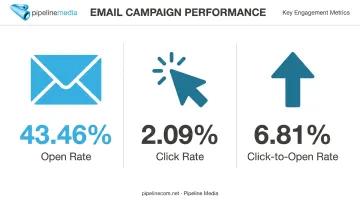
- Average campaign performance in 2025 sits around a 43.46% open rate and 2.09% click rate, per industry email benchmark data
- Segmentation and personalization beyond first names drive stronger engagement than blanket sends
- Full-service providers handle compliance, list management, and delivery so businesses skip the technical setup
What Is an Email Broadcast?
An email broadcast, sometimes called a bulk email or mass email, is a single message sent simultaneously to a large list of subscribers who've opted in to receive it. Constant Contact describes broadcasts the same way: content sent to many recipients at once, without individual customization for each person.
Here's the distinction that matters most: broadcast emails aren't spam. Spam goes to people who never agreed to receive it. Broadcasts go to consenting subscribers, people who signed up for a newsletter, made a purchase, or joined a mailing list. That consent, plus relevant and often personalized content, is what separates a legitimate broadcast from an inbox violation.
Real-World Examples
You've seen dozens of these without necessarily labeling them:
- A clothing retailer announcing a 48-hour flash sale to its entire subscriber base
- A SaaS company notifying users of an updated privacy policy or pricing change
- A nonprofit sending its monthly newsletter with program updates and donation asks
Who Sends Them, and Why
Broadcast emails show up across nearly every industry because the one-to-many format fits so many use cases:
- Marketing teams promoting sales, launches, or content
- Healthcare providers sending appointment reminders or wellness updates
- Financial institutions issuing account notices or market updates
- Government agencies distributing public notices
- Associations and nonprofits keeping members informed
The common thread: when you need to say the same thing to a lot of people at the same time, a broadcast is the tool built for it. Pipeline Media handles this exact workload for clients across these industries, managing broadcast delivery at millions of emails per hour with tracking, personalization, and unsubscribe compliance built in.
Broadcast Email vs. Autoresponder (and Transactional Email)
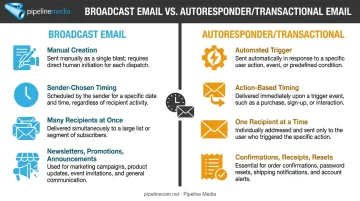
Not every email is a broadcast, even though people sometimes use the terms loosely. The key difference comes down to what triggers the send.
Autoresponders and transactional emails are automated. They fire based on a specific action, someone signs up, makes a purchase, or resets a password. These go to one person at a time, triggered by their individual behavior (Constant Contact).
Broadcast emails are manually created and sent to many people at once, on a schedule the sender chooses. Think newsletters, promotional blasts, and announcements.
| Attribute | Broadcast Email | Autoresponder/Transactional |
|---|---|---|
| Creation | Built manually for a list or segment | Configured once, triggered repeatedly |
| Timing | Sender picks the send time | Triggered by user action |
| Recipients | Many at once | One person at a time |
| Purpose | Newsletters, promotions, announcements | Confirmations, receipts, password resets |
Mixing these up matters more than it seems. A welcome email triggered by signup is not a broadcast, even if it looks similar in your inbox.
Common Types of Email Broadcasts
Most broadcasts fall into a handful of recognizable categories, each serving a different business goal.
- Newsletters — recurring updates summarizing news, content, or company activity
- Promotional announcements — sales, discounts, and limited-time offers
- Product launches — introducing new features or offerings to your full list
- Event invitations — webinars, conferences, or in-person gatherings
- Survey and feedback requests — gathering customer input at scale
Beyond these core categories, seasonal greetings and policy updates round out the list. A "happy holidays" note or a terms-of-service change notice both fit the same one-to-many, one-time model.
Regulated industries need extra care with this format. Healthcare organizations, financial services firms, and government agencies frequently use broadcasts for compliance notices and time-sensitive updates. HHS guidance under HIPAA requires written authorization before using patient information for marketing communications in most cases (HHS.gov).
Financial firms face similar oversight. FINRA Rule 2210 treats written communication sent to more than 25 retail investors within 30 days as a "retail communication," subject to fairness and recordkeeping rules. Pipeline Media works with clients across healthcare, financial services, and government to manage broadcast delivery tracking and unsubscribe compliance on every campaign.
Benefits and Drawbacks of Email Broadcasting
Broadcasting isn't a universal fix. It has clear strengths and real limitations worth understanding before you build a strategy around it.
The Benefits
- Cost-effectiveness. One message reaches thousands of inboxes for a fraction of what print, direct mail, or TV advertising would cost
- Wide, immediate reach. Ideal for time-sensitive news like flash sales or urgent service changes
- Measurable results. Open rates, click rates, and conversions inform your next campaign
Most surveyed companies report email ROI between $10 and $36 for every $1 spent, according to Litmus's 2025 research (Litmus). That's a survey range, not a guarantee, but it illustrates why broadcasting remains popular.
The Drawbacks
- Spam risk. Sending too frequently, or without segmentation, damages your sender reputation
- Limited personalization. Broad content can suppress engagement compared to targeted campaigns
Current benchmarks give useful context. MailerLite's analysis of 3.6 million campaigns in 2025 found these industry averages:
- 43.46% open rate across surveyed campaigns
- 2.09% click rate on delivered messages
- 6.81% click-to-open rate among recipients who opened the email
Compliance matters just as much as performance. Google recommends bulk senders keep spam complaint rates below 0.10%; anything above 0.30% is a serious red flag that can get your domain blocked.
One caveat: Apple Mail Privacy Protection now accounts for over half of all tracked opens, meaning your open-rate numbers may be inflated by automated pre-fetching rather than real human engagement. Click rates and conversions tell a more honest story.
Click rates and conversions tell a more honest story.
These are exactly the metrics a managed broadcasting service tracks and reports on, alongside the segmentation and compliance safeguards (like unsubscribe handling) needed to keep spam complaints low and personalization high.
How to Send an Email Broadcast: DIY Tools vs. Full-Service Support
There are two paths to getting a broadcast out the door, and they demand very different levels of internal effort.
The DIY Path
Doing it yourself typically means:
- Signing up for an email marketing platform
- Verifying a sending domain to establish deliverability credibility
- Building and cleaning your list
- Designing the email, including mobile-responsive layout
- Scheduling the send and monitoring results afterward
This checklist works fine for teams with in-house marketing staff and time to spare. The catch is that it's not a one-time setup — list hygiene, compliance monitoring, deliverability troubleshooting, and performance analysis all demand someone paying attention week after week.
The Full-Service Alternative
Agencies like Pipeline Media handle the entire process. You supply the message and the list; they handle the rest.
Here's what that actually looks like in practice:
- You send: your email list, your message, and any logos or graphics — either by email or through Pipeline's website
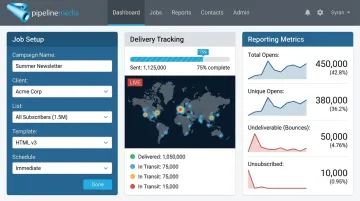
- Pipeline handles: job setup, testing, HTML conversion if needed, personalization/merging, and delivery
- Turnaround: most campaigns go live within 60–90 minutes
- Response time: a real person replies to new requests within minutes
- Compliance: Pipeline manages the unsubscribe system and works within current email regulations on the client's behalf
- Reporting: detailed tracking on opens, undeliverable addresses, and link/image engagement after each send
This matters most for teams without dedicated marketing staff, or organizations in regulated sectors that need compliance handled correctly rather than pieced together. Pipeline's infrastructure sends millions of emails per hour, well beyond what a standard email platform (or a Gmail account, for that matter) can manage for large lists.
Email Broadcast Best Practices
Whichever route you take, DIY or full-service, these practices separate broadcasts that perform from ones that get ignored or flagged. Even agencies managing campaigns on your behalf still build on these same fundamentals.
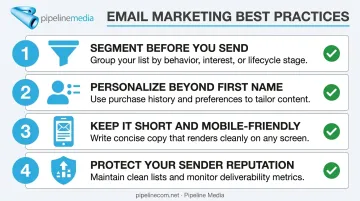
Follow these core practices before every send:
- Segment before you send. Group subscribers by purchase history, engagement level, or stated interest instead of blasting one message to your entire list.
- Personalize beyond the first name. Use past behavior, like previous purchases or content clicks, to tailor what each segment receives.
- Keep it short and mobile-friendly. One clear call-to-action beats three competing ones, since most people read email on a phone.
- Protect your sender reputation. Send consistently, monitor complaint rates, and avoid sudden volume spikes that trigger spam filters.
Personalization pays off when it's data-driven. Litmus documented a case where adding an interactive poll to collect preferences produced a 53% higher click-through rate than the non-interactive version (Litmus). It's a single case study rather than a universal guarantee, but the pattern holds across most segmentation tests: relevance drives engagement.
Test and audit regularly:
- Run A/B tests on subject lines, changing one variable at a time
- Review open, click, and unsubscribe data monthly
- Adjust segments and cadence based on what the data shows, not assumptions
HubSpot notes that weekly sending works well for some audiences and burns out others entirely. There's no universal frequency, just what your specific list tolerates.
Frequently Asked Questions
What is a broadcast email?
A broadcast email is a single message sent simultaneously to a large list of opt-in subscribers. It differs from spam because recipients have consented to receive it, unlike unsolicited bulk mail.
What's the difference between a broadcast email and an autoresponder?
Broadcasts are manually created, one-time sends going out to many people at once. Autoresponders are automated messages triggered by a specific action, like a signup or purchase, sent to one individual at a time.
How is a broadcast email different from a regular newsletter?
A newsletter is one type of broadcast email, typically sent on a recurring schedule. Broadcasts also cover one-off promotions, announcements, and event invitations that aren't recurring.
How often should a business send broadcast emails?
Frequency depends on your audience and content type. Consistency and relevance matter more than volume, with weekly to monthly being common starting points before adjusting based on engagement data.
Do I need special software to send broadcast emails?
Most businesses use an email marketing platform to manage lists and sends. Alternatively, full-service providers like Pipeline Media handle the technical setup, delivery, and compliance for you.
Is email broadcasting still effective for businesses today?
Yes. When properly segmented and compliant with anti-spam regulations, broadcast email remains one of the most cost-effective ways to reach large audiences compared to channels like direct mail or print advertising.