Most subscribers can smell a one-size-fits-all email from a mile away. They delete it, ignore it, or worse, mark it as spam. That last one hurts your sender reputation for every future send.
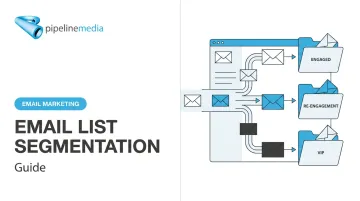
Email list segmentation fixes this. Instead of sending one message to everyone, you divide your list into targeted groups and give each one something relevant. This guide covers what segmentation actually is, why it moves the needle, the main types you can use, and a step-by-step process to start today.
Key Takeaways
- Segmented campaigns generate 30% more opens and 50% more clicks than unsegmented sends, per HubSpot's benchmark data
- Segmentation determines who gets an email; personalization shapes what they see inside it
- Behavioral data (purchases, clicks, site activity) typically predicts interest better than demographics alone
- Start with 2-3 segments tied to a clear business goal before expanding further
- Contact data decays fast, so review and refine segments on a regular schedule
What Is Email List Segmentation?
Email list segmentation means splitting your contact list into smaller groups based on shared traits, then tailoring your content to match each group. Instead of one email to 10,000 people, you might send five variations to five distinct audiences.
Segments can be broad or narrow, and the level of detail should match the message:
- Broad: All customers in the Southeast US region
- Mid-range: Customers who purchased in the last 90 days
- Narrow: Subscribers who viewed a specific product page in the last 24 hours
Narrower segments call for more specific, timely messaging. Someone who just looked at a product needs a nudge, not a generic monthly newsletter.
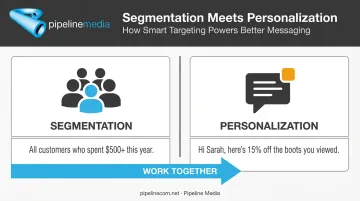
Segmentation determines who receives a campaign. It doesn't touch the content itself — that's personalization's job.
Email Segmentation vs. Email Personalization
Here's a simple way to separate the two: segmentation groups all your VIP customers together. Personalization then greets each one by name and recommends products based on their own purchase history.
They work together, not separately:
| Function | What it does | Example |
|---|---|---|
| Segmentation | Selects the audience | All customers who spent $500+ this year |
| Personalization | Customizes the message | "Hi Sarah, here's 15% off the boots you viewed" |
The highest-performing email programs use both. Segment first to find the right audience, then personalize within that segment for maximum relevance. Skip either step and you're leaving performance on the table.
Why Email List Segmentation Matters
The data on segmentation is consistent even across different studies and years. According to HubSpot's marketing statistics, segmented email campaigns generate 30% more opens and 50% more clickthroughs than unsegmented blasts.
That's a directional benchmark, not a guarantee, so measure your own results against your own unsegmented baseline rather than assuming you'll hit those exact numbers.
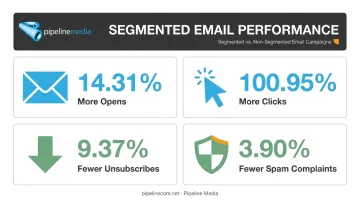
Older but more transparent data backs this up. Mailchimp's analysis of roughly 11,000 segmented campaigns against non-segmented sends from the same users found:
- 14.31% more opens
- 100.95% more clicks
- 9.37% fewer unsubscribes
- 3.90% fewer spam complaints
Notice the pattern. Segmentation boosts engagement while also limiting the damage generic blasts cause. Fewer unsubscribes and spam complaints matter more than most marketers realize.
Here's why: Inbox providers like Gmail and Outlook watch engagement signals closely. When your emails get opened and clicked, that tells the provider your content is wanted. When they get ignored or flagged as spam, deliverability suffers for every campaign you send afterward, not just that one. Segmentation protects your sender reputation by making sure the right people get the right message.
This is exactly where the mechanics of segmentation get complicated for busy teams — building rules, syncing data, and monitoring engagement across every send. Full-service email broadcasting providers handle that personalization and compliance work directly, so the deliverability gains show up without adding to your team's workload.
Types of Email List Segmentation
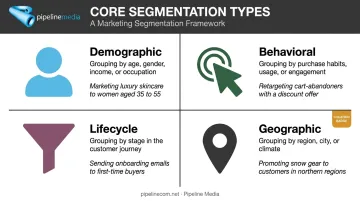
Most segmentation strategies fall into four core buckets. You don't need to pick just one. Combining a couple usually produces sharper targeting than relying on a single criterion.
Demographic Segmentation
This groups subscribers by traits like age, gender, job title, or income level. A retailer might send different promotions to 25-year-old shoppers than to 55-year-old ones, since spending habits and product interests tend to differ across age brackets.
Demographic data is easy to collect at signup and easy to build segments around. The catch: it describes who someone is, not what they currently want.
Behavioral Segmentation
Behavioral segmentation groups people by what they actually do: purchase history, email engagement, cart abandonment, or website activity. Litmus notes that behavior often predicts future interest more accurately than demographics alone.
Common examples:
- Send a replenishment reminder 30 days after a consumable purchase
- Trigger a win-back email after 60 days of inactivity
- Follow up on an abandoned cart within 24 hours
Lifecycle or Funnel Stage Segmentation
This segments contacts by where they sit in the customer journey: new lead, active customer, or at-risk/inactive subscriber. Each stage calls for different content:
- New leads: Educational, low-pressure onboarding content
- Active customers: Loyalty offers, cross-sells, product updates
- At-risk/inactive: Win-back incentives or a re-engagement survey
Matching the message to the relationship stage keeps you from pitching a hard sale to someone who just discovered your brand.
Geographic Segmentation
Location-based segmentation tailors emails by region, city, or time zone. For businesses operating across North America, that can span a four-hour gap between Atlantic and Pacific time alone, so a single send time rarely works for everyone.
Practical applications include:
- Weather-specific promotions matched to each region's season
- Local event invitations tied to a subscriber's city
- Send times scheduled around each recipient's local time zone rather than headquarters time
How to Segment Your Email List: A Step-By-Step Process
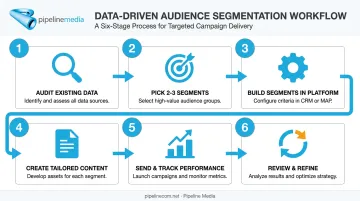
You don't need a data science team to start segmenting. Follow this process instead.
- Audit your existing data. Look at sign-up forms, purchase history, and website activity. Most businesses are sitting on more usable data than they realize.
- Pick 2-3 high-impact segments to start. Don't try to build every possible segment on day one. Choose the ones tied directly to a business goal, like reducing churn or increasing repeat purchases.
- Build the segments in your platform. Use your email tool or CRM to set up rules, and where possible, automate them so subscribers move between groups based on triggers like a purchase or an inactivity period.
- Create tailored content per segment. Match messaging, tone, and calls-to-action to what that specific group actually needs. A win-back email should read nothing like a loyalty reward email.
- Send and track performance by segment. Monitor open rate, click-through rate, and unsubscribe rate for each group separately, not just at the campaign level.
- Review and refine regularly. Subscriber behavior shifts. Revisit your segments quarterly to make sure they still reflect reality.
A practical note: businesses without the internal bandwidth to run this cycle consistently often hand off the execution, using a service like Pipeline Media's email broadcasting to manage delivery, tracking, and compliance, while keeping strategic control over the segments themselves.
Common Email Segmentation Mistakes to Avoid
Segmentation done poorly can be worse than no segmentation at all. Watch for these three traps.
Over-segmenting too early. Splitting your list into 15 micro-segments before validating even one sounds thorough, but it usually backfires. Audiences become too small to generate meaningful data or manage efficiently. Start broad, then narrow based on evidence.
Letting segments go stale. Job titles change, preferences shift, and purchase behavior evolves. A segment built a year ago on outdated assumptions can actively work against you, so build a recurring review into your calendar, quarterly at minimum.
Relying on demographics alone. Age and location tell you who someone is, not what they want right now. Behavioral and engagement data consistently predict conversion more accurately, so use demographics as a starting filter rather than the entire strategy.
Stale data is often the hardest trap to catch on your own, which is why ongoing delivery and engagement tracking matters. Pipeline Media's managed email broadcasting includes open and click reporting that flags when a segment's behavior has shifted, making it easier to catch decay before it costs you conversions.
Simplify Segmentation With a Full-Service Partner
Most small and mid-sized businesses know segmentation works. The problem isn't belief, it's bandwidth. Building segments, maintaining clean data, and managing compliance takes time most internal teams don't have.
Pipeline Media's Email Broadcasting service closes that gap. Once your segments are defined, you send the list and message, and the team handles the technical execution behind each one:
- Personalizes messages across segmented lists using extensive merge field capabilities
- Detailed tracking reports covering opens, undeliverable addresses, and which links or images recipients actually engaged with
- Manages compliance, including the unsubscribe system, on your behalf
- Delivers fast turnaround, with most jobs live within 60-90 minutes of submission
- Capacity to send millions of emails per hour once a campaign launches
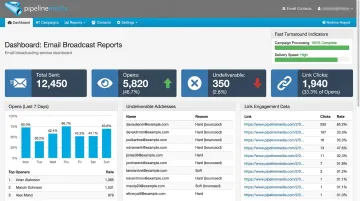
Pipeline Media has been running business communications campaigns since 2003, working across industries including Financial Services, Healthcare, Retail, Government, and Associations. If your team already knows which segments matter but lacks the tools or hours to execute consistently, a free consultation is a low-lift way to see what full-service execution looks like.
Frequently Asked Questions
What is list segmentation in email marketing?
List segmentation is the practice of dividing your subscribers into smaller groups based on shared traits, like behavior, demographics, or purchase history. This lets you send more relevant campaigns instead of one generic message to everyone.
What are the different types of email segmentation?
The main types are demographic, behavioral, lifecycle stage, and geographic segmentation. Most businesses combine two or three of these for sharper targeting rather than relying on just one.
What is the difference between email segmentation and personalization?
Segmentation determines who receives a specific campaign. Personalization customizes the content within that campaign, such as using a subscriber's name or past purchases.
How many email segments should a business start with?
Start with 2-3 high-impact segments tied to a clear goal, like reducing unsubscribes or increasing repeat purchases. Adding more too soon just creates unnecessary complexity before you've validated what works.
What data do I need to segment my email list?
Common starting points include sign-up form data, purchase history, website activity, and email engagement metrics like opens and clicks. You likely already collect more of this than you think.
Can email segmentation be automated?
Yes. Most email platforms and CRMs support rule-based segments that update automatically as subscriber behavior changes, moving contacts between groups without manual work. Full-service email broadcasting providers can also manage this segmentation and tracking on your behalf, handling the technical setup while you focus on strategy.