If this sounds familiar, you're not alone. Many teams still handle group emails the hard way, either risking a forgotten recipient or accidentally exposing everyone's address to everyone else.
This guide covers what an email distribution list actually is, how it differs from group emails and marketing lists, and how to build one step-by-step in Outlook, Gmail, and Yahoo Mail. We'll also look at when to use a distribution list for internal comms versus marketing, and how to stay compliant with laws like CASL and CAN-SPAM.
Key Takeaways
- Distribution lists are saved groups of addresses sent to via Bcc, so recipients can't see or reply to each other
- It differs from group emails (To/Cc, collaborative) and marketing lists (segmented, database-driven)
- Outlook, Gmail, and Yahoo all support distribution lists but cap recipients per message
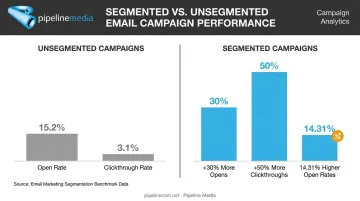
- Segmented email campaigns see up to 30% more opens than unsegmented sends
- Consent and cleanup matter: CASL and CAN-SPAM require proper unsubscribe handling
What Is an Email Distribution List?
An email distribution list is a single, saved group of email addresses you can message all at once, without typing each one out individually. Instead of adding 50 people to a new email every time, you select one list name and everyone on it receives the message.
Most distribution lists work through Bcc (blind carbon copy), which means recipients receive the message without seeing who else got it — and without being able to reply to the whole group. Microsoft's own guidance recommends placing your own address in "To" and the distribution list in "Bcc" for exactly this reason: a list left in the "To" field can sometimes be expanded, exposing every member's address to the group.
Distribution lists generally serve two purposes:
- Internal communication — company-wide announcements, department memos, or policy updates
- Email marketing — a segmented subset of a larger contact database, targeted at a specific audience
In marketing contexts, people often use "distribution list," "email list," and "segment" as if they mean the same thing. They don't, quite. A distribution list is typically static and manually managed — you add and remove people by hand. A marketing segment inside a tool like Mailchimp updates automatically based on rules, such as purchase history or engagement level. That distinction matters once your list grows past a few dozen names, and it's exactly where the three related formats below start to diverge.
Email Distribution List vs. Group Email vs. Email List
These three terms get used interchangeably, but they work differently:
| Format | Fields Used | Recipients Can See Each Other? | Best For |
|---|---|---|---|
| Group email | To/Cc | Yes, and can reply-all | Project team updates, collaboration |
| Distribution list | Bcc | No, one-way broadcast | Company memos, internal announcements |
| Email marketing list/segment | ESP database | No, managed by platform | Product promotions, targeted campaigns |
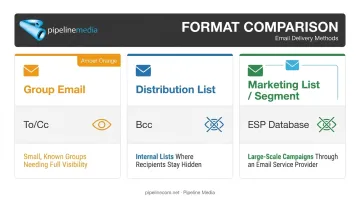
Group emails put everyone in the To or Cc fields. That's useful when people need to see each other and reply — think a five-person project team hashing out feedback. It's a poor fit for a company-wide memo, where 300 replies-all would bury everyone's inbox.
Distribution lists solve that by using Bcc: one-way, no visible recipient list, no accidental reply-all chaos.
Marketing email lists operate a level up. They're the master database behind your campaigns, which you then segment — say, "customers who bought in the last 90 days" — before sending through dedicated software. That's a fundamentally different tool than a personal Bcc list, even though the end result looks similar: one message, many recipients. Agencies like Pipeline Media manage exactly this kind of segmented email broadcasting for clients who need millions of messages delivered reliably, without the manual upkeep a static list demands.
How to Create an Email Distribution List
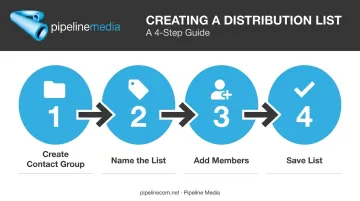
The exact steps depend on your email client, but the general process is consistent everywhere:
- Create a new contact group or list inside your contacts app
- Name it something identifiable (like "Marketing Team" or "Q3 Newsletter")
- Add member addresses one at a time, or import them in bulk
- Save the list so it's available whenever you compose a new message
For large lists, manually adding names one by one isn't realistic. Most businesses either import contacts via spreadsheet (a CSV upload) or sync new sign-ups automatically through marketing software, so the list grows without anyone touching it directly. Once a list grows into the thousands, many companies hand distribution off to an agency altogether rather than managing sends through a standard email client.
Creating a Distribution List in Outlook
In Classic Outlook:
- Open People, then select New Contact Group
- Give the group a name
- Click Add Members and select from your contacts, address book, or type new addresses
- Select Save & Close
In New Outlook or Outlook.com:
- Open People
- Choose New contact list (or select a contact, then "Add to list")
- Name it, add members, and save
Outlook also lets you set delivery permissions, controlling who is allowed to send messages to the group. Handy if you want a company-wide list that only HR or leadership can use.
Creating a Distribution List in Gmail
Gmail doesn't call these "distribution lists" — it uses labels instead:
- Go to Google Contacts
- Next to Labels, select Create label and name it
- Select the contacts you want, choose Manage labels, and apply the new label
- When composing a message, type the label name into the To field (or Bcc, for privacy) to email everyone under it
Creating a Distribution List in Yahoo Mail or Other Providers
In Yahoo Mail:
- Open Contacts, then select Lists
- Choose Create list
- Name the list and add members
- Save
Most other webmail providers and CRM platforms follow a similar "Groups" or "Lists" pattern, usually tucked under Contacts or Settings.
Key Benefits of Using a Distribution List
The core benefit is simple: you stop retyping the same 50 addresses every week, and you eliminate the risk of forgetting someone. That alone saves real time for anyone sending recurring updates.
The bigger win, though, comes from segmentation. Instead of one giant list, you break contacts into smaller, purpose-built groups:
- By department (Sales, Support, Finance)
- By engagement level (active vs. inactive subscribers)
- By interest or behavior (webinar attendees, cart abandoners)
Smaller, targeted groups get better results. HubSpot's research shows segmented email campaigns generate 30% more opens and 50% more clickthroughs than unsegmented sends. A separate Mailchimp study of roughly 11,000 campaigns found segmented emails saw 14.31% higher open rates and over 100% higher click rates compared to non-segmented ones.
The math holds up at scale, too. When Pipeline Media manages bulk email broadcasts for clients, segmented lists are what make personalization and compliance — like automated unsubscribe handling — actually workable across millions of sends.
A distribution list isn't just a time-saver, then. Split correctly, it makes every message more relevant and more likely to get opened.
When to Use an Email Distribution List
Distribution lists fit three broad scenarios, each suited to a different kind of one-way communication:
Internal communication:
- Company-wide announcements or policy updates
- Department-specific memos (all-hands vs. just Engineering)
- HR notices that don't require replies
Marketing segments:
- Engaged subscribers who open every send
- Inactive subscribers you're trying to re-engage
- Behavior-based groups, such as cart abandoners or webinar attendees
Segmented sends like these work best when open rates, click data, and unsubscribe requests are tracked properly, which is why many businesses outsource the process to an email broadcasting service rather than managing lists manually.
Client or stakeholder updates:
- Vendor updates without exposing your full contact list
- Board member briefings
- Regional office check-ins where privacy between recipients matters
The common thread across all three: one message needs to reach many people, without those people needing to interact with each other.
Best Practices for Managing Distribution Lists (and Staying Compliant)
A distribution list is only useful if it stays clean and legally sound. A few non-negotiables:
- Get explicit consent before adding external contacts to a marketing list — skipping this invites spam complaints and can get your domain blacklisted
- Clean the list regularly, removing bounced or inactive addresses to protect your sender reputation
- Honor unsubscribe requests promptly, since both Canadian and US law treat this as a mandatory requirement, not a courtesy
Two laws matter most here. CASL in Canada requires express or implied consent, sender identification, and an unsubscribe mechanism, with removal requests actioned within 10 business days. CAN-SPAM in the US takes an opt-out approach but still requires accurate headers, a physical postal address, and unsubscribe requests honored within 10 business days.
Internal employee lists get some exemptions under CASL for organization-to-organization messages, but there's no blanket exemption under CAN-SPAM if the message's primary purpose is commercial.
These consent and unsubscribe rules apply no matter how the message is sent. Bcc gives you privacy, not a compliance shortcut — accurate sender info and a working opt-out are still required on every marketing send.
Managing this list hygiene and compliance tracking manually takes time, which is why many businesses hand their email broadcasts to a provider like Pipeline Media, where unsubscribe management and delivery tracking are built into the campaign itself.
When DIY Isn't Enough: Full-Service Email Distribution Management
Bcc-based distribution lists work fine for small, stable groups. But once your list grows into the thousands, the math changes fast. Most standard email accounts, including Gmail, cap you well under 2,000 recipients per send. Segmentation, deliverability, and unsubscribe tracking become a part-time job nobody signed up for.
That's the gap Pipeline Media fills. As a full-service business communications agency in Toronto, we've managed email broadcasting campaigns for corporate clients across North America since 2003.
Here's what that looks like in practice:
- Send millions of emails per hour, far beyond what any personal or business email account allows
- Handle compliance and unsubscribe management, so you're not tracking opt-outs manually against CASL or CAN-SPAM deadlines
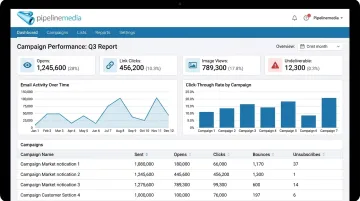
- Provide detailed tracking reports covering undeliverable emails, opens, link clicks, and image views
- Personalize at scale through extensive merge capabilities, tailoring each message to the recipient
- Get campaigns live in 60-90 minutes once you send us your list and content
You send the list and the message. We handle the setup, testing, and delivery — so you're not stuck managing spreadsheets while your actual job waits.
Book a free consultation or call 1-866-565-5317 to talk through your next campaign.
Frequently Asked Questions
What is a distribution list in email?
It's a saved group of email addresses used to send one message to many recipients at once. It's commonly used for internal announcements or targeted marketing segments, typically sent via Bcc so recipients can't see each other.
What's the difference between a distribution list and a group email?
Group emails place recipients in the To or Cc fields, so everyone can see each other and reply to the whole thread. Distribution lists are Bcc-based, one-way broadcasts with no visible recipient list.
Can I use a distribution list for email marketing campaigns?
For small lists, yes, but it's limited. Dedicated email marketing software, or a full-service provider like Pipeline Media, offers better tracking, compliance management, and personalization once your list grows.
How many people can be on an email distribution list?
Limits vary by provider. Outlook.com caps messages at 500 recipients, while paid Google Workspace accounts allow up to 2,000 total recipients per message. Larger lists typically require dedicated marketing software or a broadcast service.
Is it legal to add someone to a distribution list without permission?
For marketing lists, no — consent is generally required under laws like CASL in Canada and CAN-SPAM in the US. Internal company lists, such as employee announcement lists, are typically exempt.
How do I keep a distribution list clean and effective?
Remove bounced or inactive addresses regularly, honor unsubscribe requests within the legal timeframe (10 business days under both CASL and CAN-SPAM), and review your segments periodically to make sure they still match your audience.