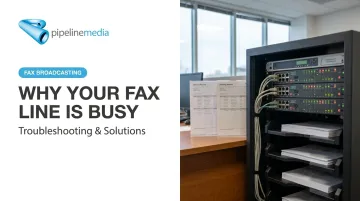
Here's what most people get wrong: a busy signal rarely means "the line is just busy." It can mean a wrong number, a call waiting conflict, a VoIP codec issue, or a hardware problem on your own end. Each cause needs a different fix.
This guide breaks down what a busy signal actually means, the five most common causes, a step-by-step troubleshooting process, and when it makes more sense to stop chasing the problem and switch to a fax method that doesn't rely on a single phone line at all.
Key Takeaways
- A busy signal can mean an occupied line, a wrong number, or a technical handshake failure
- Regular busy tones (slow beeps) point to the recipient; fast busy/reorder tones point to a network issue on your end
- Most VoIP-related fax failures trace back to codec incompatibility — request T.38 or G.711 from your provider
- Retry 3-4 times at 5-minute intervals before assuming a deeper problem exists
- High-volume senders can avoid busy signals altogether by using a managed fax broadcasting service with automatic retry logic
What Does It Mean When a Fax Line Is Busy?
A busy result means the phone network couldn't complete the connection to the receiving fax machine. Depending on your device, you'll see this as "Busy," "No Response/Busy," or simply "Line Busy" on the display or in the transmission report.
Fax machines use a structured handshake defined by the ITU-T T.30 standard. Before a single page transmits, the two machines step through several phases:
- Call setup — establishing the initial connection
- Capability negotiation — the receiving machine shares its supported settings
- Document transfer — the actual page data moves across the line
- Confirmation — both machines verify the transmission completed
Any interruption in that sequence, human or technical, can register as a failure. This is one reason fax broadcasting services flag and retry problem numbers automatically rather than treating every busy signal as a lost cause.
Two Very Different Busy Tones
Not all busy signals sound the same, and the difference matters:
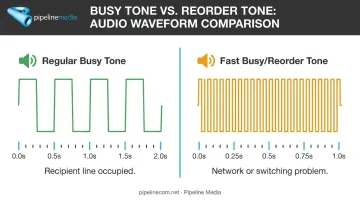
- Regular busy tone — slow, evenly spaced beeps (roughly a 300-1,100 millisecond cycle). This means the recipient's line is genuinely occupied.
- Fast busy/reorder tone — rapid beeps, roughly twice the speed. This indicates a network or switching problem, not an occupied line.
Cisco's standard configuration illustrates the gap well: busy tone cycles at 0.5 seconds on/off, while reorder tone cycles at 0.25 seconds on/off. If you're hearing the fast version, retrying the same number over and over won't fix anything — the problem lives in the call path, not the destination.
Common Causes of a Busy Fax Signal
Busy signals aren't random. They fall into five recognizable categories, and identifying which one you're dealing with saves you from wasting time on the wrong fix.
Cause 1: Recipient's Line Genuinely in Use
Symptoms: Regular busy tone, resolves after retrying a few minutes later.
This is the most straightforward cause: another fax transmission or voice call is occupying the line. High-volume offices like medical practices and government agencies often run a single fax line handling constant traffic, making this the default explanation worth ruling out first.
Cause 2: Wrong or Outdated Fax Number
Symptoms: Consistent busy or ringing regardless of time of day, or the call connects to a voice line instead of a fax tone.
A transposed digit, a missing area code, or a number pulled from an outdated business card are common culprits. If retrying at different times of day produces the same result, the number itself is likely the problem.
Cause 3: Call Waiting, Voicemail, or Line Features Interfering
Symptoms: Transmission starts, then drops. Or the handshake never completes despite a technically working line.
Call waiting tones, digital voicemail pickup, and certain call-forwarding configurations can corrupt the analog signal mid-transmission. Brother's own troubleshooting documentation recommends disabling call waiting and voicemail specifically because these features can interrupt fax reception on shared lines.
Cause 4: VoIP Line Rejecting the Fax Handshake
Symptoms: Intermittent busy signals or failures that started right after switching to a VoIP or internet-based phone system.
Fax machines rely on precise analog tones. VoIP systems often compress audio using codecs built for human speech, not fax signaling, and that compression can distort the tones enough to break the handshake.
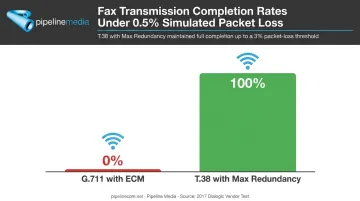
A 2017 Dialogic vendor test illustrates just how fragile this can be. Under a controlled 0.5% packet loss simulation, standard G.711 fax transmissions using ECM dropped to a 0% completion rate, while T.38 with maximum redundancy stayed at 100% completion through the test's 3% packet-loss threshold. The fix is protocol-specific: ask your VoIP provider to enable T.38 (built for fax over IP) or confirm proper G.711 pass-through rather than a compressed voice codec like G.729.
Cause 5: No Dial Tone or Dead Line on the Sending End
Symptoms: Your machine reports "Busy" or "No Response/Busy" even though nothing is wrong with the recipient.
A loose cable, a cord plugged into the wrong port, or a genuine line outage on your side can all trigger this. Confirm with your provider before assuming the recipient is at fault.
How to Fix a Busy Fax Line: Step-by-Step
Jumping straight to "retry and hope" wastes time. Identifying which category your problem fits first means you fix it once instead of repeatedly hitting the same wall.
Step 1: Confirm the Fax Number and Test the Line
Call the number from a mobile phone or landline and listen for a fax tone. Better yet, verify the number directly with the recipient rather than trusting an old business card or website listing.
Step 2: Check the Communication Result Report
Your machine generates a failure code after each attempt. Manufacturer documentation (Ricoh, HP, Brother) defines these codes clearly:
| Code | Meaning |
|---|---|
| Busy | Recipient's line is occupied |
| No Answer | Recipient didn't pick up, or fax negotiation failed |
| No Facsimile Connection | No fax connection was ever established |
This code tells you whether to focus on your end or theirs.
Step 3: Rule Out Call Waiting, Voicemail, and VoIP Conflicts
Disable call waiting on the line before dialing. Turn off voicemail interception if the line shares voice and fax duties. If you're on VoIP, contact your provider and request G.711 or T.38 specifically for the fax line.
Step 4: Inspect Physical Connections and Dial Tone
Confirm the phone cable runs from the wall jack to the LINE port, not the EXT port. Swap in a known-working two-wire cable (a four-wire cord can cause reception issues). Power cycle the machine if there's no dial tone.
Step 5: Retry Strategically and Escalate if Needed
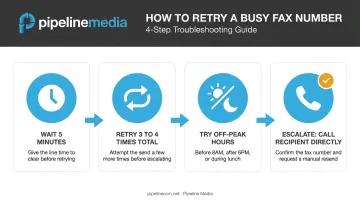
- Wait 5 minutes, then retry — don't hammer the same number back-to-back
- Attempt 3-4 times total before assuming a deeper issue
- Try off-peak hours: before 8 AM, after 6 PM, or during lunch
- If it's still failing, call the recipient directly to confirm the number or request an alternate fax line
If busy signals and dropped connections keep recurring, the problem may be the phone line itself rather than any single setting. Services like fax-to-email remove that variable entirely by sending and receiving faxes over the internet, so a busy analog line never enters the equation.
Troubleshoot Forever or Switch to a More Reliable Fax Method?
Manual troubleshooting works fine if you send the occasional fax on a single dedicated line and can tolerate a retry or two. That's a reasonable trade-off for low volume.
It stops making sense once your business depends on getting time-sensitive documents through reliably — especially to industries where fax lines see constant traffic, like healthcare, legal, and government offices. ONC data from 2021 shows 69% of U.S. hospitals still used mail or fax to send patient records, and 78% used it to receive them. Fax isn't going away in these sectors, and neither is the busy-signal risk that comes with high traffic volume.
Switch to a managed service if:
- You send faxes regularly, not occasionally
- Missed transmissions have real compliance or business consequences
- You're sending to offices known for busy lines (healthcare, legal, financial services)
- You're running response-driven campaigns where inbound volume could overwhelm a single line
How a Managed Fax Broadcast Removes the Busy-Signal Problem
Pipeline Media's fax broadcasting service sidesteps the busy-signal issue by routing through dedicated fax infrastructure instead of a single phone line. A few specifics:
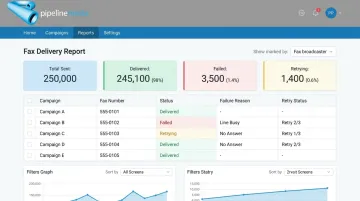
- Automatic retries: every problem number gets retried 3 times, free of charge, before it's marked as failed
- Detailed delivery reports: you see exactly who received the fax, who didn't, and the specific reason for each failure
- Throughput: over 1 million pages per hour, with most broadcast jobs completing in under an hour
- Inbound fax handling: for campaigns expecting high response volume, a dedicated toll-free number absorbs incoming traffic so respondents never hit a busy signal on your end
That last point matters more than people expect. If you're sending a survey to thousands of pharmacies or a compliance notice to hundreds of law offices, the returning wave of faxes can overwhelm a single line just as easily as outgoing traffic can.
Going Fully Digital with Fax-to-Email
Broadcasting solves the busy-signal problem for high-volume campaigns, but some businesses want to remove the physical line from the equation entirely. Pipeline Media's Fax-to-Email service lets you send and receive faxes from any device — no machine, no dedicated phone line.
| Plan | Monthly Cost | Pages In/Out | Overage Rate |
|---|---|---|---|
| Standard | $10 USD | 100 / 100 | $0.10/page |
| Pro | $20 USD | 250 / 250 | $0.08/page |
Both plans support US and Canadian city numbers, come with no setup fee, and can be cancelled anytime. One customer, Andy R. of Detroit, put it simply: switching let his team "get rid of our old fax machines in 5 offices," giving each rep a personal fax number they could use on the road.
Mistakes to Avoid & Preventive Best Practices
A few habits cause more repeat failures than the busy signal itself:
- Retrying a wrong number repeatedly instead of confirming it with the recipient first, which wastes attempts on a line that will never connect
- Ignoring the Communication Result Report, when the failure code usually explains exactly what went wrong before you try again
- Leaving call waiting and voicemail active on a dedicated fax line, which invites handshake interference
- Sending high-priority faxes during peak hours without a backup number for offices known to run busy lines
Build these into a habit instead:
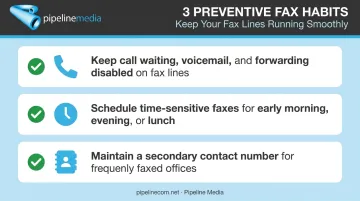
- Keep call waiting, voicemail, and call forwarding disabled on any line used primarily for fax
- Schedule time-sensitive faxes for early morning, evening, or lunch hours
- Maintain a secondary contact number for offices you fax regularly
Checking the Communication Result Report matters even more when sending in bulk. Pipeline Media's fax broadcasting service automatically retries problem numbers up to three times and includes detailed delivery reports, so failed sends get flagged and resolved without extra manual work on your end.
Frequently Asked Questions
What does it mean if a fax line is busy?
It means the phone network couldn't connect to the receiving fax machine — either the line is genuinely occupied, the number is wrong, or a technical issue like VoIP compression or call waiting is blocking the handshake.
Can a fax machine show busy if it's out of paper or memory is full?
Yes. Some machines stop answering incoming calls when the paper tray is empty or memory is full, and the sending machine interprets this as a busy or no-answer signal.
How many times should I retry a busy fax number?
Retry 3-4 times at roughly 5-minute intervals. If it's still failing after that, the issue is likely deeper than a genuinely busy line.
Does a busy signal always mean I dialed the wrong number?
No — it's a common cause but not the only one. Verifying the number directly with the recipient is the fastest way to rule it out.
Why does my fax get a busy signal only since switching to VoIP?
VoIP codecs compress audio in ways that can distort the tones fax machines rely on. Ask your provider to enable the T.38 protocol or confirm G.711 pass-through for your fax line.
Is there a way to avoid busy signals altogether?
Yes. Fax broadcasting and fax-to-email services, like those Pipeline Media offers, bypass the physical phone line entirely. They automatically queue and retry transmissions so you never encounter a busy signal.