Sending one seems easy. Type up an update, hit send, done. But results vary wildly depending on your platform, list quality, content strategy, and consistency. Some newsletters build loyal readerships. Others get buried, ignored, or reported as spam.
This guide walks through the exact steps to build a newsletter that works, what you need before you start, the factors that separate high performers from the rest, common mistakes to avoid, and when outsourcing to a full-service provider makes more sense than doing it all yourself.
Key Takeaways
- Five core steps: define your audience, build a compliant list, design content, test, then refine
- Subject lines, segmentation, mobile design, and cadence matter more than your platform choice
- Unsubscribe links, sender authentication, and consent records are non-negotiable at any list size
- No internal bandwidth? A full-service communications agency can handle newsletter production for you
How to Create an Email Newsletter: Step-by-Step
Step 1: Define Your Newsletter's Purpose, Audience, and Frequency
Before touching a template, get clear on why you're sending this newsletter at all. Is it nurturing leads, driving repeat sales, or keeping clients informed on company news? Whatever the goal, it needs to tie back to a broader marketing objective, not exist as a standalone habit.
Next, map out your audience segments:
- Prospects who haven't purchased yet
- Existing customers who need retention content
- Partners or referral sources who want industry updates
Each group responds to different content, so identify what resonates with each before you write a single word.
Finally, pick a sending cadence you can actually sustain. Weekly works well for content-rich businesses; biweekly or monthly suits teams with less bandwidth. The cadence you choose should match your content capacity, not your ambition.
Step 2: Choose Your Platform and Build a Compliant Subscriber List
Platform choice matters less than people assume, but it still matters. Compare options based on:
- Ease of use for your team's technical skill level
- Template quality and customization flexibility
- Segmentation capabilities
- Pricing tiers relative to your expected list size
Once you've settled on a tool, focus on building your list the right way. Use opt-in forms on your website, gated resources, or sign-up incentives instead of buying lists. Purchased lists tank deliverability and violate most platforms' terms of service anyway.
Every single send needs a working unsubscribe link, and removal requests must be honored promptly. This isn't optional.
Under CAN-SPAM in the US, that mechanism must function for at least 30 days, with requests processed within 10 business days. Canada's CASL law goes further, generally requiring consent before you send at all, with similar 10-business-day processing rules once someone opts out.
Full-service providers like Pipeline Media manage this compliance layer directly, tracking unsubscribes and honoring removal requests as part of ongoing email broadcasting campaigns.
Step 3: Design and Write Your Newsletter Content
Your subject line and preview text decide whether the email gets opened. Keep it benefit-driven and specific. Mailchimp recommends staying under 9 words and 60 characters as a general guideline, though testing your own audience beats blindly following any rule.
Pair that with a branded header: logo, consistent colors, and contact details so recipients recognize you instantly.
For the body, structure content so it's scannable:
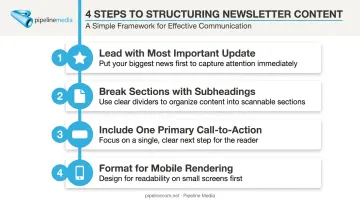
- Lead with the most important update or offer
- Break sections with clear subheadings or dividers
- Include one primary call-to-action (not five competing ones)
- Format everything to render cleanly on mobile screens
Mix content types based on what you defined in Step 1: company updates, curated industry resources, and occasional promotions. A newsletter that's 100% sales pitch loses readers fast.
Step 4: Test and Prepare for Compliance Before Sending
Never send a newsletter without previewing it across multiple devices and inbox providers. Formatting that looks perfect in one email client can break entirely in another.
Before launch, confirm three things:
- Sender authentication is set up. Gmail requires SPF and DKIM for every sender, plus DMARC once you exceed 5,000 daily messages, or your mail risks landing in spam.
- The unsubscribe link actually works. Test it yourself before your subscribers have to.
- Send timing is researched, not guessed. Optimal send times vary by industry and audience, so check what's worked for similar businesses and schedule in advance rather than sending reactively.
Step 5: Send, Track Performance, and Refine
Once you hit send, monitor delivery in real time. Bounces and errors are easier to fix in the first hour than after the fact.
After the send, track:
- Open rate: the percentage of recipients who opened the email
- Click-through rate: the percentage who engaged with your content
- Unsubscribe rate: the percentage who opted out
For context, MailerLite's 2025 benchmark data across all industries showed roughly 43% average opens, 2% clicks, and a 0.22% unsubscribe rate, though e-commerce and other sectors trend lower. Use industry-specific benchmarks, not blanket averages, to judge your own performance.
Then run A/B tests, starting with subject line variations since they're easiest to test, and apply what you learn to the next send. This is how newsletters improve over time instead of stalling out.
Key Factors That Affect Newsletter Success
Hitting "send" is the easy part. What happens after depends on a handful of variables you actually control.
Subject Line & Preview Text
This is your first impression, and it decides whether the email gets opened at all. A generic or vague subject line gets ignored, no matter how good the content inside is.
Subject-line testing has produced open-rate swings of up to 23% between variants in documented A/B tests. That gap is reason enough to treat your subject line as an ongoing experiment, not a one-time decision.
Content Relevance & Segmentation
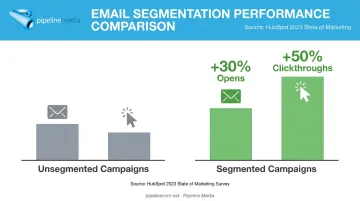
Sending the same message to your entire list, regardless of who they are, is one of the fastest ways to lose engagement. Segmented email campaigns generate 30% more opens and 50% more clickthroughs than unsegmented ones, according to HubSpot's 2023 State of Marketing survey. That gap alone justifies the extra setup time.
Design & Mobile Responsiveness
Most of your audience is reading on a phone, not a desktop. Roughly 60% of email campaigns are opened on mobile devices, according to Campaign Monitor's 2025 small-business benchmark data. A layout that breaks on mobile means the majority of your audience sees a broken product.
Sending Frequency & Consistency
Send too often and subscribers tune out or unsubscribe. Send too rarely, and they forget why they signed up.
GetResponse's 2024 benchmark data found that open and click rates were consistently higher for lists sent once weekly versus two or three times weekly. That's correlation, not proof that frequency alone drives long-term retention. Still, consistency, showing up on the schedule you promised, tends to matter more than the exact number picked.
Common Mistakes to Avoid When Creating an Email Newsletter
Most underperforming newsletters fail for the same handful of reasons:
- Blanket sending. One generic email to the whole list instead of segmenting by interest, behavior, or purchase history
- Ignoring mobile. Skipping responsive design testing, resulting in broken layouts for the majority of readers
- Skipping analytics. Never reviewing open rates or click data means the same weak subject lines and formats get repeated indefinitely
- Overlooking compliance. Missing unsubscribe links or unclear sender identity creates real legal exposure under email marketing law
Compliance failures carry real financial stakes. Each violating email under CAN-SPAM can carry penalties up to $53,088 according to the FTC's compliance guide, and Canada's CASL allows penalties reaching C$10 million per violation for corporations. Treat compliance as ongoing risk management, not a one-time checkbox.
DIY vs. Outsourcing: Alternatives to Consider
DIY newsletters work well for plenty of businesses. But managing lists, design, compliance, and deliverability in-house isn't always the best use of your team's time, especially once volume grows.
All-in-One Email Marketing Platform (Self-Managed)
Best for smaller lists, tight budgets, and teams that want full creative control over design and send timing.
Trade-off: Someone on your team needs ongoing time to learn the tool, manage compliance, and interpret reporting. That's a real cost even if the software itself is inexpensive.
Full-Service Business Communications Agency
This model suits businesses with limited internal marketing resources that want newsletters, list compliance, and delivery reporting handled end-to-end.
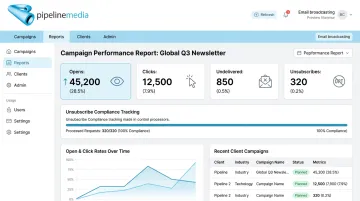
Pipeline Media, for example, manages email broadcast campaigns for clients across industries like healthcare, financial services, and retail. Reports cover unsubscribe compliance, undeliverable emails, opens, and link/image engagement, so nothing falls through the cracks. Most campaigns go live within 60 to 90 minutes of a client submitting their list and content, with every job tested before deployment.
Trade-off: Less day-to-day control over minor design tweaks, though a responsive provider typically offsets this with fast turnaround.
Hybrid Approach (In-House Content, Outsourced Execution)
Choose this route if your team wants to write its own content but hand off technical setup, compliance, and list management to a partner.
Trade-off: Requires a clear handoff process between your team and whoever handles execution, so nothing gets lost between drafting and sending.
If you're unsure which model fits, Pipeline Media's free consultation walks through your specific volume and goals before you commit to anything.
Conclusion
Building an effective email newsletter comes down to clear goals and relevant content, backed by consistent testing. No single trick or template replaces that groundwork.
Newsletters usually underperform because of skipped preparation, poor segmentation, or ignored analytics — the sending platform is rarely the real problem.
Whether you manage the process in-house or hand it to a full-service partner like Pipeline Media's email broadcasting team, the right approach balances quality, compliance, and consistency. Get those three right, and the platform becomes a minor detail.
Frequently Asked Questions
What is the best way to send a newsletter?
It depends on list size and internal resources. Small lists often run fine on a simple email marketing platform, while larger or resource-constrained teams get more consistent results with a full-service provider like Pipeline Media handling delivery and compliance.
Can I send a newsletter to anyone?
No. Recipients must have opted in or otherwise given consent under regulations like CAN-SPAM and CASL, and every newsletter needs a working unsubscribe option to stay compliant.
How often should I send an email newsletter?
Weekly or biweekly works well for most businesses maintaining engagement, but the right frequency depends on your content capacity and audience expectations. Consistency matters more than the specific number you pick.
What should I include in an email newsletter?
A strong newsletter includes a branded header, a clear and specific subject line, scannable and valuable content, one primary call-to-action, and an unsubscribe link.
How do I grow my email newsletter subscriber list?
Use permission-based tactics: opt-in forms on your site, lead magnets, and promoting sign-up across channels you already own. Avoid purchased lists entirely.
Is it better to build a newsletter in-house or outsource it?
In-house works well for hands-on control with smaller lists. Outsourcing to a full-service agency like Pipeline Media suits businesses that want compliance, list management, and reporting handled without dedicating internal staff time.