A missing authentication record, a stale list, or a sudden volume spike can flag you as a spammer almost overnight. Uploading a list and hitting send looks simple. The results, however, depend on list quality, sending infrastructure, authentication setup, and pacing, which is why well-intentioned senders still end up buried in spam folders.
This guide covers what actually separates inbox delivery from a block: the setup required before you send, the technical factors mailbox providers track, common mistakes to avoid, and when it makes more sense to hand sending off to a full-service provider.
Key Takeaways
- Gmail flags senders as "bulk" past 5,000 emails/day to personal accounts, triggering stricter enforcement.
- Domain/IP warm-up, SPF/DKIM/DMARC authentication, and double opt-in hygiene aren't optional; they're prerequisites.
- Blocks rarely stem from a single bad email; they result from stacked issues—weak lists, volume spikes, and missing authentication.
- Businesses lacking in-house deliverability expertise cut risk by using a managed email broadcasting service.
How to Send Mass Emails Without Getting Blocked
Preparation beats improvisation here. Follow these five steps in order, and don't skip ahead to volume before the groundwork is solid.
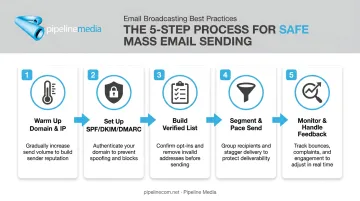
Step 1: Warm Up Your Sending Domain and IP Address
New domains and IPs have zero sending history. Mailbox providers have no reason to trust them yet, so a sudden burst of bulk volume looks suspicious even if your intentions are good.
Start small and scale gradually:
- Begin with a low daily volume sent to your most engaged contacts
- Increase volume by a fixed percentage each week rather than doubling overnight
- Extend your warm-up window over several weeks depending on your target send volume
Mailchimp's recommended warm-up schedule starts at just 5-10% of planned volume in week one, building to full volume by week four. There's one non-negotiable condition throughout: bounce and complaint rates must stay consistently low. If they spike, pause the increase until they settle back down.
Step 2: Set Up SPF, DKIM, and DMARC Authentication
Authentication tells mailbox providers you are who you say you are. Without it, your bulk mail simply won't qualify for inbox placement at Gmail or Yahoo, regardless of how clean your list is.
You need three things configured on your domain:
- SPF record listing every IP authorized to send on your behalf
- DKIM signing enabled on the sending domain, cryptographically confirming the message wasn't altered
- A published DMARC policy (at minimum
p=none) telling receivers how to handle mail that fails authentication
Run your setup through a free authentication checker before your first send. This isn't a nice-to-have step. Gmail and Yahoo require it for anyone crossing their bulk-sender thresholds, and skipping it is one of the fastest ways to get filtered out entirely.
Step 3: Build and Verify a Permission-Based Email List
Every address on your list should have opted in, ideally through double opt-in confirmation. Purchased, scraped, or long-dormant lists are magnets for spam traps, and traps do far more damage to your reputation than a low open rate ever could.
Before every send:
- Run your list through a verification tool to catch invalid, disposable, and role-based addresses
- Remove anything that bounced on a prior send
- Never "reactivate" an old list without re-verifying it first
Clean data isn't glamorous, but it's the single biggest lever you control before you even hit send.
Step 4: Segment, Personalize, and Pace Your Send
Blasting your entire list at once is a red flag to automated filters. Segmenting by behavior, engagement, or demographics lets each batch receive genuinely relevant content, and throttled batches look far more natural than one instant blast.
The payoff is measurable. In a Mailchimp analysis of roughly 11,000 segmented campaigns, segmented sends produced 14.31% higher open rates, 100.95% higher click rates, and nearly 10% fewer unsubscribes than non-segmented campaigns to the same audiences.
Personalized subject lines matter too. They reduce spam complaints and lift opens, which directly protects your sender reputation heading into your next campaign.
Step 5: Monitor Deliverability and Handle Feedback Loops
Sending isn't the finish line. After every campaign, track three numbers:
- Bounce rate
- Spam complaint rate
- Unsubscribe rate
Tools like Google Postmaster Tools and Microsoft SNDS surface this data, usually within about 24 hours. Set an internal threshold (many senders use Gmail's own benchmark of staying under a 0.10% complaint rate) that triggers an automatic pause if crossed.
Finally, include a working one-click unsubscribe link and process opt-outs within 24-48 hours. Slow opt-out handling generates repeat complaints, and repeat complaints are what actually sink long-term reputation.
Running all five steps correctly takes real time and technical oversight every single campaign. Pipeline Media's email broadcasting service manages warm-up, authentication, list hygiene, and unsubscribe compliance for clients sending millions of emails per hour, so deliverability stays protected without the manual monitoring.
What You Need Before Sending a Mass Email Campaign
Preparation, not luck, decides whether a campaign lands in the inbox or triggers a block. Before you touch send, confirm you have the following in place.
Equipment and system requirements:
- An ESP or SMTP relay capable of handling your target send volume
- A reputable dedicated or shared IP with clean sending history
- DNS access to publish SPF, DKIM, and DMARC records
List and content conditions:
- Verified, opted-in contacts collected within the last 6-12 months
- Correctly formatted HTML kept under standard size limits
- Zero purchased or rented data, ever
Compliance readiness:
You'll also need a working understanding of the laws governing commercial email in your market:
- CAN-SPAM (US): accurate headers, honest subject lines, a physical postal address, and a working opt-out
- CASL (Canada): express or implied consent, sender identification, and an unsubscribe mechanism valid for 60 days
- GDPR (EU): lawful consent, transparent data use, and the right for recipients to object at any time
Pipeline Media builds this compliance layer, including unsubscribe management, into every broadcast campaign it manages for clients.
Missing any one of these puts both deliverability and legal compliance on the line.
Key Factors That Determine Whether Your Emails Get Blocked
Mailbox providers track a handful of variables continuously, and getting even one wrong can undo everything else you did right.
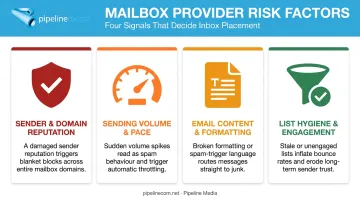
Sender and Domain Reputation
Every domain and IP carries a trust score built from sending history, complaint rates, and blocklist status. A low score gets your mail filtered to spam or blocked outright, no matter how good your content is. Reputation is earned slowly and lost quickly.
Sending Volume and Pace
Reputation aside, a sudden spike in volume looks identical to a compromised account to automated filters. It doesn't matter that you're a well-established, legitimate business running a fully compliant campaign. Gradual, consistent pacing builds trust over time; bursty sending resets whatever progress you'd made.
Email Content and Formatting
Content matters too: spam filters scan for trigger words, excessive links, image-only bodies, and broken HTML. Clean, text-balanced, personalized content passes filters more reliably and earns better inbox placement. This is one area where simpler is genuinely better.
List Hygiene and Engagement
Beyond formatting, hard bounces and spam traps signal poor list sourcing faster than almost anything else. Regularly scrubbed, engaged lists sustain the open and click rates that reinforce your sender reputation over time. Full-service email broadcasting providers, including Pipeline Media, build compliance and unsubscribe management into every campaign, keeping list hygiene consistent. A smaller, healthier list will always outperform a larger, stale one.
Common Mistakes That Get Mass Emails Blocked
Most blocks trace back to a small set of avoidable errors:
- Skipping warm-up entirely and blasting full volume on day one from a brand-new domain or IP
- Ignoring authentication errors instead of fixing missing or misaligned SPF, DKIM, and DMARC before scaling
- Reusing old or purchased lists that reintroduce spam traps and hard bounces every time they're "reactivated"
- Overlooking early warning signs, like a rising complaint rate or a dropping open rate, instead of pausing to investigate
None of these mistakes happen in isolation. They compound. A weak list plus a volume spike plus missing authentication is how a single campaign takes down a domain that took months to build.
DIY Sending vs. Using a Full-Service Email Broadcasting Provider
Self-managed sending works for some teams. It isn't the only path, and for many businesses, it isn't the most efficient one either.
Dedicated ESP/SMTP Platform (Self-Managed)
This route suits teams with in-house deliverability or IT expertise who send consistent, moderate volumes and want full control over infrastructure and reporting.
Trade-off: you own ongoing monitoring, warm-up management, and troubleshooting. Warming up a new sending domain alone typically takes two to four weeks, and every mistake lands squarely on your own domain reputation.
Full-Service Email Broadcasting Partner
This route suits businesses that want campaigns fully managed: list handling, authentication, unsubscribe compliance, and delivery, without dedicating internal staff to deliverability upkeep.
Pipeline Media, for example, manages sending infrastructure and unsubscribe compliance end-to-end. Clients send their list, message, and graphics; the provider handles the rest:
- Sends millions of emails per hour, with most jobs completing in 60-90 minutes
- Handles setup, testing, and launch before any message goes out
- Delivers post-send reports covering opens, clicks, and bounces
Trade-off: less hands-on technical control, in exchange for lower block risk and a much faster turnaround, since the provider owns the reputation management.
| Factor | Self-Managed ESP | Full-Service Provider |
|---|---|---|
| Setup time | Weeks (warm-up + auth) | Days |
| Technical control | Full | Limited |
| Reputation risk | Falls on your domain | Managed by provider |
| Best for | In-house deliverability teams | Teams without dedicated IT resources |
If your team doesn't have someone watching Postmaster Tools weekly, a free consultation is a faster way to get a campaign live safely than building the infrastructure from scratch.
Frequently Asked Questions
How do I send bulk email without getting blacklisted?
Warm up your domain and IP gradually, set up SPF, DKIM, and DMARC, and use only permission-based lists. Pace your sends and monitor bounce and complaint rates after every campaign.
Is signing people up for spam illegal?
Yes. Adding people to email lists without consent violates CAN-SPAM, CASL, and GDPR, and can result in fines plus revoked sending privileges from your ESP.
What's the safe daily limit before I'm flagged as a bulk sender?
Gmail's commonly cited threshold sits around 5,000 emails per day to personal accounts, though Yahoo declines to publish a fixed number. Limits vary by provider and your sending history.
Can I send mass emails from a regular Gmail or Outlook account?
Not at scale. Gmail caps personal accounts at 500 messages a day (2,000 for Workspace), and Outlook.com has similar caps. Beyond small volumes, you need dedicated bulk-sending infrastructure.
How long does IP or domain warm-up typically take?
Most warm-up schedules run two to four weeks, depending on your target volume and how consistently your engagement metrics hold up along the way.
What's the difference between an email blast and a transactional email?
An email blast is a marketing-driven mass send to a list. A transactional email is a one-to-one message triggered by a specific action, like a receipt or password reset.