Introduction
Open a marketing email today, and something happens before you even finish reading the subject line. A tiny image loads. A link gets rewritten. Somewhere, a server logs the moment.
Email tracking has become a standard, mostly invisible layer built into the sales and marketing emails companies send every day. According to BBC's report on a review by the email service Hey, tracking pixels showed up in two-thirds of emails sent to personal accounts, after filtering out spam.
That scale reveals a gap in understanding on both sides. Most senders trust their open rate dashboard without knowing what it actually measures, while recipients often overestimate how much tracking reveals.
This guide breaks down exactly how email tracking works, step by step, not just the marketing definition.
Key Takeaways
- Email tracking uses pixels, coded links, and read receipts to monitor opens, clicks, and replies
- Tracking triggers the moment a recipient's email client loads an image or clicks a link
- Accuracy varies by device and privacy settings, so open rates are directional, not exact
- Sales teams, marketers, and email marketing platforms all rely on it to measure engagement at scale
What Is Email Tracking?
Email tracking is the practice of monitoring whether, when, and how a recipient interacts with a sent email. Before tracking existed, senders had zero visibility after hitting send. The message either landed or didn't, and that was the end of the story.
Tracking closed that gap, but it has limits worth naming upfront:
- It doesn't reveal changes to message content after sending
- It's not the same as tracing an unknown sender's identity (that requires header analysis, covered later)
- It isn't foolproof surveillance — plenty of opens go unrecorded
Despite growing privacy pushback, tracking remains the fastest way to gauge engagement at scale. Sales and marketing teams still need some signal for prioritizing follow-ups, even an imperfect one. This is exactly why full-service email broadcasting relies on tracking data — knowing which recipients opened or clicked shapes how a campaign's follow-up gets prioritized.
Three Types, Three Mechanisms
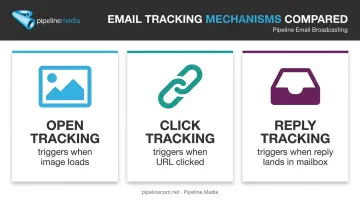
Email tracking splits into three categories, each working differently under the hood:
- Open tracking — pixel-based, triggers when an image loads
- Click tracking — link-based, triggers when a URL is clicked
- Reply tracking — inbox-based, triggers when an actual reply lands in a connected mailbox
Understanding which mechanism produces which data point matters. A pixel firing tells you something loaded. It doesn't tell you a human read the message.
How Does Email Tracking Work?
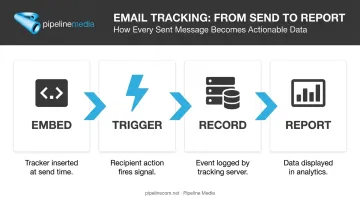
Tracking unfolds in a predictable sequence: embed, trigger, record, report. Each stage happens automatically, with no manual intervention from the sender once the campaign launches.
Initiation: Embedding the Tracker
Tracking begins the moment an email is composed and sent. The sending software (whether that's an ESP or a full-service platform) automatically inserts:
- A tracking pixel — a tiny, invisible 1x1 image embedded in the HTML body
- A uniquely coded link — the visible URL is swapped for one that routes through a tracking server first
The sender never touches code. Mailchimp's own documentation confirms this embedding happens automatically as part of standard campaign sending.
Core Operation: Triggering the Signal
Here's where the mechanics actually play out:
For opens: When the recipient's email client renders the message, it requests the pixel image from the tracking server. That HTTP request gets logged as an open. No image load means no recorded open, which is why plain-text emails can't be pixel-tracked at all.
For clicks: Clicking a trackable link doesn't take you straight to the destination. It first sends you through the tracking server, which logs the click before redirecting you to the actual URL. The delay is usually imperceptible.
For read receipts: This is the oldest method, still common in corporate/internal systems like Outlook. Unlike pixels, read receipts are opt-in on the recipient's end. The email client asks the recipient to confirm they've read the message, and the recipient can simply decline.
Some platforms will even count an open when a tracked link gets clicked, even if the pixel itself never fired. That's why a recorded "open" timestamp sometimes matches a click timestamp exactly.
Accuracy and Limitations
This is where things get messy, and where most confusion about "open rate" numbers comes from.
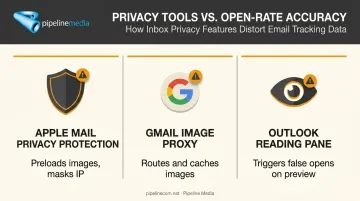
Apple Mail Privacy Protection (MPP), launched in 2021, is the biggest disruptor. Apple's own documentation explains that when enabled, Apple Mail preloads remote content in the background, whether or not the recipient ever opens the message. This creates machine-generated opens and masks the real IP address.
Gmail's image proxy works similarly, though for different reasons. Gmail routes image requests through Google's own servers rather than the sender's, and caches images so repeated views don't always trigger repeated requests. This protects recipient privacy but muddies open-count accuracy.
Outlook's Reading Pane creates a different kind of false positive. If a user has automatic image downloads enabled, simply previewing an email in the reading pane can fire the pixel, recording an "open" even though nobody actually read the message.
ESPs have responded by building filters:
| Platform | Bot/Proxy Filtering Approach |
|---|---|
| Mailchimp | Excludes MPP-affected opens for sends after June 2024; flags antivirus scanners and automated link checks |
| HubSpot | Filters suspected bot activity using IP blocklists and interaction patterns (can be disabled) |
| Campaign Monitor | Non-human click filter removes machine-originated events from reports |
None of these filters are perfect. They're best-effort corrections layered on top of an imperfect signal.
Output: What Tracking Produces
Once triggered, tracking data flows into reporting dashboards. Typical output includes:
- Timestamps for opens and clicks
- Total open/click counts per recipient and per campaign
- Approximate location (when not masked by privacy tools)
- Device and email client type
- Link-level engagement — which specific URLs got clicked
This data feeds directly into follow-up timing for sales reps and content optimization for marketers. A cold lead who opened an email three times in one afternoon looks a lot warmer than one who never opened it.
Full-service agencies like Pipeline Media handle this entire pipeline for clients running bulk email broadcasts, delivering the open, click, and engagement reports without requiring in-house tracking setup.
Where Is Email Tracking Used?
Tracking shows up wherever businesses need to measure engagement at scale, but it performs best in specific contexts.
Common use cases include:
- Sales outreach: A rep sees a prospect opened an email and clicked the pricing link twice — that's the signal to pick up the phone
- Marketing campaigns: Teams compare subject lines, send times, and creative variations against real open and click data
- Mass business communications: Newsletters, announcements, and broadcast campaigns depend on tracking most heavily, since volume creates statistically meaningful patterns
Tracking works best on HTML-formatted emails sent at scale. Consistent data across large recipient lists reveals genuine engagement trends rather than noise from a handful of individual reads.
That scale requirement is exactly why full-service providers build tracking into the send itself rather than treating it as an add-on. Pipeline Media builds tracking directly into its Email Broadcasting campaigns, which run at millions of emails per hour. Clients send their list, message, and creative assets, then receive detailed reports showing:
- Which emails were undeliverable
- Which emails were opened
- What links and images recipients actually clicked on
There's no separate tracking tool to configure. The reporting — branded internally as the "Follow-Through" feature — comes bundled with the campaign send itself, alongside personalization capabilities that merge recipient-specific fields into each message.
Benefits and Limitations to Keep in Mind
Tracking turns guesswork into data. Instead of wondering whether a campaign landed, senders can see who opened, who clicked, and who went cold — then prioritize follow-up accordingly.
But it's not exact. A few realities worth internalizing:
- Open rates should be read as directional trends, not precise counts
- Privacy protections (Apple MPP, Gmail proxying) inflate or distort raw numbers
- Over-indexing on open rate alone, without factoring in clicks or replies, can lead to bad prioritization calls
These accuracy gaps are only half the picture. Responsible tracking also means staying compliant: regulations like CAN-SPAM require accurate sender information, a working opt-out mechanism honored within 10 business days, and a valid physical address in every commercial email. GDPR and ePrivacy rules in the EU go further, generally requiring consent before deploying tracking pixels at all.
Pipeline Media handles this compliance layer directly for clients, managing the unsubscribe system and structuring campaigns to align with current email regulations, so businesses running broadcast campaigns aren't left interpreting the legal fine print themselves.
Conclusion
Strip away the jargon, and email tracking comes down to a simple automated chain: embed, trigger, record, report. A pixel or coded link gets inserted at send time, the recipient's interaction fires the signal, a server logs it, and that data rolls up into a dashboard.
Understanding this chain changes how you should read the numbers. An open isn't always a human open. A missing click doesn't always mean disinterest.
For businesses that don't want to manage pixel configuration, bot filtering, and compliance rules in-house, working with a full-service partner remains the simpler path. Pipeline Media builds tracking and compliance management directly into its Email Broadcasting service, delivering the data clients need without the technical overhead.
Frequently Asked Questions
How can I track the sender of an email?
This is different from open/click tracking. Tracing a sender involves examining email headers for the originating IP address, typically using header-analysis tools rather than pixels or links.
How can I tell if someone is using an email tracker?
Look for unusually long or coded links, or warnings from your email client (Gmail flags "hidden images" in some cases). You can also install a pixel-blocker extension like Ugly Email or PixelBlock to flag trackers automatically.
Is email tracking illegal?
Generally no, but it's regulated. Senders must comply with laws like CAN-SPAM in the US and GDPR/ePrivacy in the EU, which require honoring opt-outs and disclosing data practices.
What is a tracking pixel?
It's a tiny, invisible 1x1 image embedded in an email's HTML. When the email loads, the pixel requests itself from a server, logging that open event.
Can recipients block email tracking?
Yes. Disabling automatic image loading in your email client settings, or using a pixel-blocking browser extension, prevents most tracking pixels from firing. Clicked links and replies remain visible either way.
Does email tracking work the same way on mobile devices?
Mostly. Mobile mail apps support the same pixel and link tracking methods as desktop. Apple's Mail Privacy Protection applies across iPhone, iPad, and Mac, though, restricting IP-based location data for Apple users.