Healthcare providers, law firms, and government agencies still rely on fax daily, but the phone line and clunky machine are disappearing. A 2023 ONC data brief found that 67% of U.S. non-federal acute care hospitals often or sometimes sent summary-of-care records through eFax integrated with their electronic health records, with 62% receiving them the same way.
That's Internet fax (I-Fax) at work.
As more businesses shift operations to the cloud, I-Fax adoption keeps climbing because it strips out hardware costs and phone line fees while still satisfying compliance requirements. But here's where people get tripped up: many assume I-Fax is just emailing a scanned PDF, or that it works identically to traditional fax. It doesn't, and that confusion causes real problems when businesses try to choose a provider or set one up correctly.
This guide breaks down exactly what I-Fax is and how it works, step by step.
TL;DR
- I-Fax sends and receives faxes over the internet instead of a phone line, usually as email attachments or through a web platform
- Documents get converted into standardized image formats (TIFF, PDF) before transmission
- Three main types exist: email-based faxing, fax server/gateway services, and mobile fax apps
- Healthcare, legal, financial, and government sectors use I-Fax where fax is still required but landlines are being phased out
- Pipeline Media's Fax-To-Email service lets you send and receive faxes from any device, no fax machine needed
What Is Internet Fax (I-Fax)?
I-Fax is a method of sending and receiving faxes using the internet rather than the public switched telephone network (PSTN). Documents get converted into image files and transmitted as email attachments or through a web-based platform.
Traditional faxing needed a dedicated phone line, a physical machine, and per-minute or per-page charges, especially painful for long-distance or high-volume sending. I-Fax removes all three dependencies.
I-Fax Isn't Just "Emailing a PDF"
This is the biggest misconception. I-Fax follows standardized fax protocols, specifically ITU-T Recommendation T.37, first approved in 1998, which governs store-and-forward fax transmission over the internet. That standardization is what lets an I-Fax service communicate with an old-school fax machine on the other end.
A generic PDF sitting in an email doesn't meet this standard on its own. I-Fax also differs from IP fax, which runs over a private office network or intranet rather than the public internet — different infrastructure, different use case.
Why It's Still Relevant
Email dominates business communication, yet fax hangs on in specific industries because:
- Healthcare, legal, and government sectors often require fax for compliance or legal documentation
- Signature verification standards in some workflows still point to fax
- HHS permits faxing protected health information (PHI) for treatment purposes under HIPAA, provided reasonable safeguards are in place
Three Types of I-Fax
These compliance needs explain why fax persists, but the method of sending one has evolved. Three main approaches exist today:
| Type | How it works | Typical user |
|---|---|---|
| T.37 standard | Email-based, machine-to-machine using Internet mail (SMTP/MIME) | Enterprise systems, EHR integrations |
| Fax-to-email/gateway services | Provider's server converts and routes faxes | Businesses without in-house fax infrastructure |
| Mobile fax apps | Phone camera captures document, cloud service transmits | Remote or mobile workers |
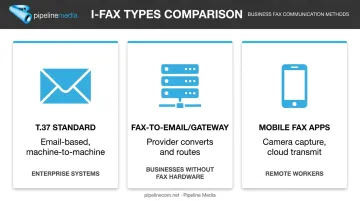
The entry point differs, but the underlying process stays consistent across all three. Pipeline Media's Fax-To-Email service fits the second category, letting businesses send and receive faxes from any device without maintaining fax hardware.
How Does Internet Fax Work?
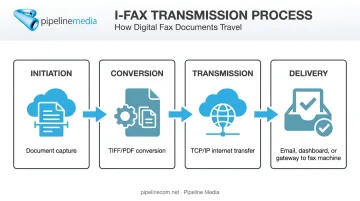
Regardless of which type you use, I-Fax follows the same four-stage sequence: capture, conversion, transmission, and delivery.
Initiation: Capturing and Preparing the Document
The process starts when someone scans a physical document, uploads a digital file, or snaps a photo through a mobile app.
Initiation can be:
- Manual — a user uploads a file directly
- Automated — office multifunction printers route scanned jobs straight to an I-Fax queue
The common bottleneck here is image quality and file format compatibility. A poor scan or an unsupported format causes delivery failures. Most services support TIFF, PDF, DOC, and JPEG to avoid this problem.
Core Operation: Conversion and Transmission
The document gets converted into a standardized image file, commonly under the T.37 protocol's TIFF profiles, then attached to an email or uploaded to a fax server.
Technical note: T.37 requires simple-mode devices to support a minimum baseline called Profile S, defined in RFC 3949. TIFF-F, the format most people reference, falls under a related profile (Profile F). So "T.37 uses TIFF-F" is close but not the complete picture.
From there, the file travels over TCP/IP via the internet, not analog signals over a phone line, to the recipient's email address or the fax service's gateway. Because transmission rides on internet bandwidth instead of a phone connection:
- Multiple faxes send or receive simultaneously
- Large or lengthy documents transmit faster
- Costs drop compared to traditional per-minute fax charges
At scale, this distinction is significant: Pipeline Media's Fax Broadcast service transmits over 1 million pages per hour, letting most recipients receive documents simultaneously instead of waiting in the slow, sequential queue older analog machines required.
Gateways and Delivery Verification
Not every recipient uses a modern I-Fax setup. When the person on the other end still has a physical fax machine, a fax gateway manages the handoff between the internet-based sender and the traditional phone network. RFC 4160 defines exactly how this gateway maps addressing, capability, and status information between the two environments.
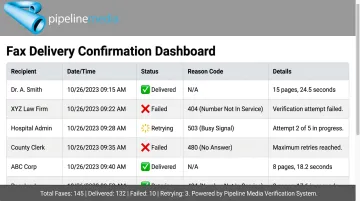
Delivery confirmation matters just as much as the handoff itself. Most services provide sent/received status reports so users aren't left guessing whether a fax made it through.
Pipeline Media builds this verification directly into its process:
- Automatically retries all failed fax numbers three times, free of charge
- Delivers detailed reports showing who received the document, who didn't, and the specific reason for any failure
Without this kind of verification, there's no way to confirm whether a time-sensitive document, such as a medical record or a signed contract, actually reached its destination — a real compliance risk for regulated industries.
Output: Delivery and Storage
The recipient gets the fax as an email attachment, a notification in a web dashboard, or a printed page if they're still using a traditional machine.
Because the output is digital, it can be:
- Stored electronically instead of filed on paper
- Searched by keyword or date
- Forwarded instantly to another department or client
Reliable, legible delivery isn't just a nice-to-have. It directly affects turnaround time on approvals, compliance audits, and client communications. A garbled or delayed fax in healthcare or legal settings can stall an entire workflow.
Where Internet Fax Is Used
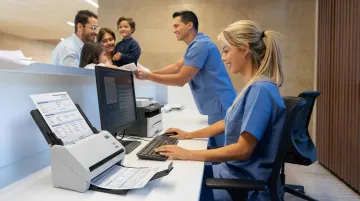
I-Fax fits naturally into workflows where a physical signature or fax trail still carries weight: signed contracts, medical records, insurance claims, and compliance documents.
It performs best under specific conditions:
- High document volume that would overwhelm a single office machine
- Distributed teams without a shared office fax line
- Staff needing to send faxes from mobile devices, with no IT-managed hardware in sight
Industry patterns vary. Healthcare and legal sectors lean on I-Fax for compliance and record-keeping. HHS confirms fax remains an accepted method for sharing PHI for treatment purposes, provided reasonable safeguards are applied. Retail and logistics companies take a different approach. They rely on fax broadcasting to send high-volume order or shipment confirmations to dozens or hundreds of recipients at once.
Meeting these varied needs often requires outsourcing to a full-service provider. Pipeline Media, for instance, handles both ends of this spectrum:
- Fax-to-Email for individual or small-team needs — dedicated numbers tied to almost any US or Canadian city, starting at $10 USD/month with no setup fee
- Fax broadcasting for bulk campaigns — sending thousands of confirmations or notices in a single run, with delivery reports for every recipient
Businesses that want this capability without managing servers, gateways, or compliance logistics in-house typically outsource it entirely. One client, Andy R. from Detroit, MI, noted the switch let his company "get rid of our old fax machines in 5 offices," with reps now sending and receiving faxes on the road.
Conclusion
I-Fax works by converting documents into standardized image files and transmitting them over the internet instead of a phone line. Email or web-based gateways then deliver those files to digital inboxes and traditional fax machines alike.
Understanding this mechanism actually changes how you shop for a provider. Instead of comparing prices alone, look at delivery verification, security practices, and whether the service type (email-based, gateway, or mobile app) fits how your team actually works.
Pipeline Media's Fax-To-Email service reflects this approach, with Standard and Pro tiers, no setup fees, and delivery reports so you always know a document reached its destination. A free consultation call can help you determine which plan fits your volume and workflow.
Frequently Asked Questions
Is iFax the same as fax?
iFax uses the internet instead of a phone line, but it still follows fax standards like T.37, so it can communicate with traditional fax machines. Functionally, it achieves the same result through a different transmission method.
Does iFax cost money?
Most services charge a subscription or per-page fee to cover data transmission and conversion. Pipeline Media's Standard plan starts at $10 USD/month for 100 incoming and outgoing pages, with Pro at $20 USD/month for 250 pages.
What is an iFax number?
It's a dedicated virtual fax number assigned by a provider, letting you send and receive faxes without a physical phone line. Pipeline Media, for example, lets subscribers choose a number from almost any US or Canadian city.
Is Internet fax secure?
Reputable I-Fax services use safeguards and encryption options during transmission, making it more secure than standard email. That's a key reason regulated industries like healthcare and legal continue relying on it.
Do I need a fax machine to send an I-Fax?
No. Documents can be sent from a computer, smartphone, or scanner using an I-Fax service or app. I-Fax can still reach traditional fax machines through a gateway when needed.
What file format does I-Fax use?
Most services use TIFF, specifically TIFF-F under the T.37 standard, for compatibility with traditional fax machines. Many providers also accept PDF, DOC, and JPEG for sending and receiving.