Introduction
Picture an office manager at the multifunction printer, contract in hand. Two buttons stare back: Scan to Email and Fax. Both digitize the page—but only one produces a confirmation report that holds up if a client later claims they never got it.
That choice matters more than it looks. Send protected health information through a standard email account, and you risk a HIPAA violation. Miss a court filing deadline because an email quietly bounced, and you have no confirmation report to show a judge you sent it on time.
Despite decades of email adoption, fax hasn't disappeared from regulated industries. In 2021, 69% of hospitals still used mail or fax to send summary-of-care records to outside providers. Another 78% used that same combined channel to receive them, according to ONC data on hospital interoperability.
This article breaks down when scan to email wins, when fax still wins, and how to choose with confidence.
Key Takeaways
- Scan to email creates a file you send separately; fax transmits directly to a number and returns a confirmation receipt in one step
- Healthcare, legal, government, and financial services lean on fax because it carries compliance weight and documented delivery proof
- Speed, near-zero cost, and image quality make scan to email the better pick for everyday, non-regulated correspondence
- Fax-to-email hybrids deliver fax-level certainty without owning a physical machine
- The right choice depends on regulatory need, proof-of-delivery requirements, and what your recipient can actually accept
Scan to Email vs Fax: Quick Comparison
Here's how the two methods stack up across the factors that drive a business decision:
| Factor | Scan to Email | Fax |
|---|---|---|
| Cost | Near-zero if you already own a scanner or MFP | Per-page or subscription cost; online fax often cheaper than owning a machine |
| Delivery Speed | Instant send, but no confirmation the recipient opened it | Slightly slower transmission, but includes a time-stamped confirmation report |
| Security & Compliance | Traverses multiple email servers; not HIPAA compliant without separate encryption | Point-to-point; HIPAA-permitted with proper safeguards, per HHS guidance |
| Legal Validity | Emailed signatures are easier to challenge; no standardized delivery proof | Faxed signatures are widely recognized; confirmation reports carry weight in disputes |
| Equipment Needed | Any scanner, MFP, or phone camera plus an email account | A fax number, plus either a machine or a fax-to-email service |
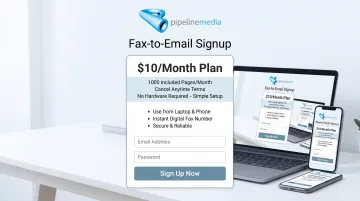
You no longer need a physical fax machine to send or receive faxes. Pipeline Media's Fax-to-Email service starts at $10 USD a month for 100 incoming and 100 outgoing pages, with no setup fee and cancel-anytime terms—so any laptop or phone works as a fax line.
What Is Scan to Email?
Scan to email digitizes a physical document into a PDF or image file, then routes it to an inbox as an attachment. It's become the default for everyday business correspondence for one simple reason: almost everyone already has the equipment.
Core benefits include:
- Near-instant delivery once the file is attached and sent
- Minimal cost — no per-page charges if you already own a scanner
- Easy editing, OCR text extraction, and digital archiving
- High image fidelity for detailed documents like blueprints or spreadsheets
There's no single way to do this anymore. Common approaches include:
- Multifunction printers that scan and email from the office floor
- Mobile scanning apps that turn a phone camera into a document scanner
- Direct-to-cloud workflows that skip the inbox and drop files into storage folders
Use Cases of Scan to Email
Scan to email dominates internal, low-stakes document sharing:
- Internal memos and meeting notes
- Client correspondence that doesn't involve legal signatures
- Digital record-keeping for non-regulated files
- Document sharing between remote or hybrid team members
Marketing agencies, retail operations, tech companies, and general SMBs without regulatory constraints run almost entirely on this model.
A Forrester Consulting survey of 450 senior IT and business leaders found 47% had already moved to fully digital document processes. Another 72% still ran a mix of paper and digital workflows, according to a Forrester-Adobe study on digital document adoption. That mix is exactly where scan to email lives: fast enough for daily use, but not built for anything that needs proof it arrived.
What Is Fax?
Fax is a direct, point-to-point transmission to a recipient's fax number that produces a confirmation report the moment it completes. No inbox, no server hop, no waiting to hear back — the machine (or service) tells you it landed.
That confirmation is exactly why regulated industries haven't walked away from it. HHS guidance confirms the Privacy Rule permits fax transmission of patient information between providers when reasonable safeguards are in place, such as confirming the recipient's number beforehand. Core benefits include:
- Legally recognized delivery confirmation with a timestamp
- HIPAA-permitted transmission when proper safeguards are followed
- Reduced audit and dispute risk compared to unconfirmed email sends
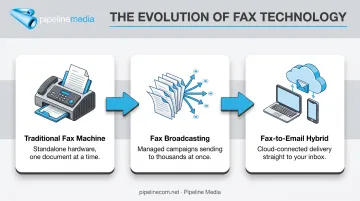
Fax has also evolved past the machine sitting in the corner. Fax broadcasting lets an organization send the same document to thousands of recipients in one job. Fax-to-email hybrids let anyone send or receive faxes from a computer or phone, no hardware required.
Pipeline Media's fax-to-email plans start at $10/month with no setup fee, and fax numbers are available in almost any US or Canadian city.
Use Cases of Fax
Fax remains the backbone of workflows where a missed or disputed delivery has real consequences:
- Signed contracts requiring authentication
- Medical record transfers between providers
- Insurance prior authorization requests
- Government and court filings with hard deadlines
Healthcare, legal, financial services, insurance, and government agencies still lean on it heavily. According to the 2023 CAQH Index, CAQH estimated 236 million medical prior-authorization transactions industry-wide. Roughly 90 million of those were fully manual (a category that includes fax, phone, mail, and email—not fax alone).
Fax sits in that manual bucket because it still meets compliance requirements email alone can't guarantee.
Scan to Email vs Fax: Which Is Better?
Neither method wins outright. The decision comes down to five questions:
- Does a regulation govern this document (HIPAA, court rules, insurance requirements)?
- Do you need legally admissible proof the recipient received it?
- Can the recipient actually accept a fax, or only email?
- What's your document volume — one-off or high frequency?
- What's your budget for hardware, subscriptions, or per-page costs?
Choose scan to email for fast, informal, high-volume internal sharing. Choose fax when the document must hold up legally, involves protected health information, or needs proof it reached the recipient.
Courts have already weighed in on why that proof matters. In Laouini v. CLM Freight Lines, a fax confirmation report showing a three-page transmission to the EEOC became central evidence in a discrimination claim. The Seventh Circuit ruled the confirmation was strong evidence of receipt, but not conclusive on its own, and sent the case back for further review.
That is the value a fax confirmation carries: it does not guarantee a win, but it gives you something to point to when delivery is disputed. A misdirected or unconfirmed email offers nothing comparable.
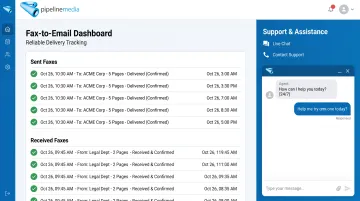
For businesses that need digital convenience without giving up delivery certainty, a managed fax-to-email service closes that gap. Pipeline Media's Fax-to-Email lets any device send and receive faxes, with confirmation records retained digitally and real-person support that typically responds within minutes.
If your business sends compliance-sensitive documents on a regular basis, explore a hardware-free fax setup before your next audit or filing deadline forces the issue.
Conclusion
The right choice depends on what the document is actually worth. A weekly internal memo doesn't need a confirmation report. A signed contract, a medical record transfer, or a court filing does.
Get that match right, and the payoff shows up in practical terms:
- Fewer compliance risks
- Clearer delivery records when something is disputed
- Less administrative overhead chasing documents that never confirmed receipt
Whether that means sticking with simple scan to email for everyday correspondence, or switching to a fax-to-email service that handles sending end-to-end, the tool should fit the stakes of what you're sending.
Frequently Asked Questions
What is the difference between a scan and a fax?
Scanning only captures a document as a digital file, which you then have to send separately through email or another channel. Faxing scans and transmits the document directly to a recipient's fax number in one step, with a confirmation receipt included.
Why do people prefer fax over email?
Fax offers a time-stamped, legally recognized delivery confirmation and tighter alignment with regulations like HIPAA. Regulated industries favor it because it removes ambiguity about whether a document actually reached its destination.
Is scan to email as secure as fax?
Standard scan to email is less secure since it passes through multiple email servers and often lacks built-in encryption. Fax transmits more directly point-to-point, though security ultimately depends on the safeguards each business applies to either channel.
Can I send a fax without owning a fax machine?
Yes. Fax-to-email and online fax services let you send and receive faxes from a computer, phone, or tablet without any dedicated hardware or phone line, from anywhere you have an internet connection.
Is scan to email HIPAA compliant?
Standard scan to email isn't HIPAA compliant on its own, since email typically lacks the required encryption and access controls. Fax can meet HIPAA requirements when paired with proper safeguards, such as confirming the recipient's number in advance.
Which is cheaper: scan to email or fax?
Scan to email is nearly free if you already own a scanner. Online fax-to-email services, often around $10 to $20 a month, are typically the most cost-effective way to get fax compliance benefits without buying hardware.