The problem: not all fax methods are created equal. Terms like "direct fax" and "direct send" get thrown around loosely, and businesses often can't tell whether their fax method is genuinely secure or just old technology with a new interface.
This guide breaks down what secure direct fax actually means, how to send one from a computer, what makes a fax transmission secure, and what to look for in a provider.
Key Takeaways
- Send documents from a computer or email account—no physical fax machine required.
- Direct send delivers point-to-point without manual relays, reducing exposure points.
- Encryption, documented compliance controls, and delivery tracking separate secure services from basic ones.
- Regulated industries meet compliance needs while cutting administrative costs.
What Is Secure Direct Fax?
Secure direct fax means sending and receiving fax documents electronically, through a computer, email address, or web portal, with encryption and authentication protecting the data while it travels. There's no phone line dial-up and no physical machine spitting out pages.
Traditional analog faxing works differently. It relies on phone lines and standalone machines, which means documents can sit exposed in open trays, get picked up by the wrong person, or transmit over unmonitored lines. Anyone walking past a shared office fax machine has probably seen this problem firsthand.
Digital fax removes that physical exposure. Documents move as encrypted data files rather than printed pages waiting in a tray.
What Does "Direct Send" Mean in Direct Faxing?
"Direct send" refers to a fax traveling straight to the recipient's number or inbox, without being manually relayed or parked on intermediate physical devices along the way. Fewer touchpoints mean fewer chances for data to leak.
A few practical notes:
- Direct send methods typically route through secure digital protocols rather than open telephone lines.
- Delivery is faster and easier to audit than legacy fax relay setups.
Not all "direct" transmission is equally secure. Standard email-based fax gateways use TLS encryption for individual connection hops, but that doesn't automatically protect the entire path from sender to recipient. Ask your provider how their network handles end-to-end security.
How to Send a Secure Direct Fax From Your Computer
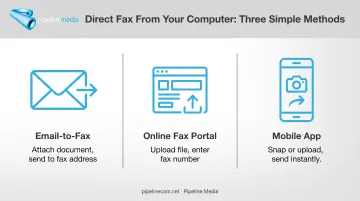
You don't need a fax machine anywhere in the building. There are three common ways to send a direct fax from a computer:
- Email-to-fax: Compose an email, attach your document, and send it to the recipient's fax address (often
faxnumber@service-domain). - Online fax portal: Log into a web dashboard, upload your file, and enter the destination fax number.
- Mobile app: Snap a photo or upload a document from your phone or tablet and send it the same way.
The basic workflow is nearly identical across methods:
- Compose your email or open your fax dashboard.
- Attach the document you want to send.
- Enter the recipient's fax number in the required format (often something like faxnumber@service-domain).
- Hit send.
File format compatibility matters. Most services accept PDF, DOC/DOCX, TIFF, and JPEG, though support varies by provider. An incompatible file type is one of the most common reasons a fax fails on the first try.
Reputable services encrypt the handoff between your device and the fax network, so the document is not exposed like an open email attachment. After you send, you should get a delivery confirmation, a failure alert, or a retry notice—so you know a time-sensitive file actually arrived.
For businesses that want to skip the machine entirely, Pipeline Media's Fax-to-Email service lets you send and receive faxes from any computer, phone, or tablet. Pick a number from almost any US or Canadian city at setup, with no setup fee and cancel-anytime billing:
- Standard — $10/month: 100 incoming and 100 outgoing pages
- Pro — $20/month: 250 pages each way
What Makes Direct Faxing Secure?
Security in direct faxing comes down to a few overlapping layers, not a single feature.
Encryption protocols. TLS (Transport Layer Security) protects data while it moves between sender, provider network, and recipient. Standard email encryption like STARTTLS secures individual hops between mail servers, not the full path from your inbox to the recipient's, according to NIST's guidance on trustworthy email.
Closed, provider-controlled networks that keep documents digital end-to-end create a stronger security boundary than a basic email gateway.
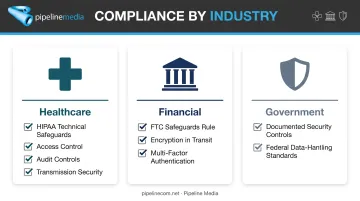
Compliance frameworks. Regulated industries need to think beyond encryption alone:
- Healthcare organizations must satisfy HIPAA's technical safeguards, including access control, audit controls, and transmission security.
- Financial institutions fall under the FTC Safeguards Rule, which requires encryption of customer data in transit and multi-factor authentication.
- Government agencies often need providers with documented security controls appropriate to federal data-handling requirements.
HHS doesn't officially "certify" products as HIPAA-compliant. Compliance depends on how an organization configures and uses a service, not on a marketing label. If a provider claims certification, ask exactly what that means and get it in writing.
Physical exposure elimination. No printed pages sitting in a shared tray means no risk of the wrong employee, visitor, or cleaning crew glancing at sensitive paperwork.
Access controls. Received faxes should arrive in encrypted inboxes with restricted retrieval, not just sit accessible to anyone who walks by.
The stakes are real. In 2024, HHS received 663 reports of large healthcare data breaches affecting roughly 242.9 million people. Its annual report to Congress specifically cites mistakenly faxing one person's clinical record to another as unauthorized disclosure.
Secure transmission prevents that kind of damage.
Benefits of Secure Direct Faxing for Businesses
Beyond security, digital fax pays for itself in a few concrete ways:
- Lower operating costs — No dedicated fax lines, paper, toner, or machine maintenance
- Device flexibility — Send and receive from laptops, tablets, or phones with no office visit
- High-volume scale — Broadcast to large lists with automatic delivery reporting
One Pipeline Media client in Sacramento reported saving hundreds of dollars per week after moving her fax traffic off traditional lines. Another eliminated fax machines across five offices entirely, giving staff individual fax numbers they could use while traveling.
Hybrid and remote teams stay on fax workflows from anywhere. When volume spikes—referrals, compliance notices, company-wide announcements—Pipeline Media's fax broadcast platform can transmit over 1 million pages per hour, with most jobs done in under an hour plus automatic delivery reporting.
Choosing the Right Secure Direct Fax Provider
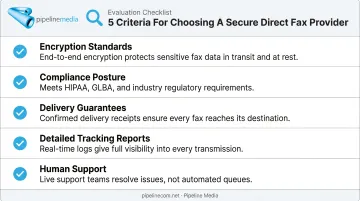
Not every "secure fax" claim holds up under scrutiny. Here's what actually matters when comparing providers:
- Encryption standards: Confirm what protects your data in transit, not just on the marketing page.
- Compliance posture: Ask for specifics on how the provider supports HIPAA, financial, or government requirements. Get documentation, not just a checkbox.
- Delivery guarantees: Look for automatic retries on failed numbers rather than a single send-and-hope attempt.
- Detailed tracking reports: You should be able to see who received a document, who didn't, and why.
- Human support: For time-sensitive documents, waiting on a support ticket is a liability. Responsive, real people matter.
Those checkpoints are where Pipeline Media focuses. The company has served healthcare, finance, and government clients across North America for over 20 years, with both Fax Broadcast and Fax-to-Email services.
Every failed number gets three free retry attempts. Every campaign includes detailed delivery reports showing successful and failed transmissions, with reasons attached.
Campaign requests get a response from an actual person within minutes, not an automated queue.
Frequently Asked Questions
How do I send a direct fax from my computer?
Email your document to a fax-to-email address or upload it through an online fax portal, entering the recipient's fax number in the required format. No physical machine is needed at any point.
What does "direct send" mean in direct faxing?
Direct send means the fax travels straight to the recipient without manual relay steps, using secure digital protocols instead of physical handling or open phone lines.
Is direct faxing HIPAA compliant?
Many direct fax services can support HIPAA compliance when configured with proper encryption and access controls, but compliance depends on your setup, not just the product. Confirm certifications and safeguards directly with your provider.
Do I need a fax machine to send a secure fax?
No. Secure faxes can be sent from any computer, phone, or tablet using email or an online fax platform.
Is fax more secure than email?
Encrypted direct fax can reduce interception risk compared to standard email, particularly for sensitive documents, since it often involves fewer intermediate hops. Actual security still depends on the provider's specific network and controls.
How much does a secure direct fax service cost?
Pricing varies by provider and volume. Basic fax-to-email plans often start around $10/month, with higher-tier plans including more pages for higher-volume use.