This happens more often than most marketers admit. Sending a mass email looks simple, but results depend on list quality, infrastructure, authentication, and content working together. Skip one piece and the whole campaign can land in spam instead of inboxes.
This guide walks through the exact steps to send an email blast correctly, what you need before you start, the deliverability variables that make or break your results, and the mistakes to avoid.
Key Takeaways
- Email blasts are marketing-initiated sends to large lists, distinct from transactional emails triggered by user actions
- Deliverability depends on domain reputation, list hygiene, authentication, and content, not just send volume
- Google treats anyone sending 5,000+ emails/day to Gmail as a bulk sender subject to stricter rules
- Outsourcing to a full-service broadcast provider avoids the need for in-house deliverability expertise
How to Send an Email Blast: Step-by-Step
Step 1: Choose the Right Sending Method or Provider
Your first decision shapes everything downstream: DIY email service provider, an email API, or a full-service broadcast provider.
Each option handles volume differently:
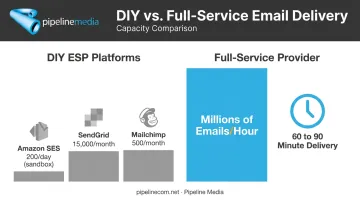
- Amazon SES — sandbox accounts start at just 200 recipients per 24 hours, and production quotas require approval and scale by account (AWS documentation)
- SendGrid Marketing Campaigns — basic plans cover 5,000 contacts and 15,000 emails per month, scaling to custom plans above 2.5 million monthly emails
- Mailchimp — free tier caps at 500 sends per month; paid tiers allow sends up to 10-12x your contact limit
None of these publish a true emails-per-minute throughput guarantee — you're buying a monthly or daily capacity, not a speed promise. That capacity ceiling is exactly what pushes many businesses with larger lists toward full-service providers instead.
Full-service providers work differently. Pipeline Media, for example, has run email broadcasting since 2003 and advertises the ability to send millions of emails per hour, with most campaigns live within 60-90 minutes of submission. You send your list and creative, and the provider's infrastructure absorbs the volume, sidestepping the send-rate limits DIY platforms impose.
Before committing to any platform, confirm it can handle your actual list size without throttling mid-send. A provider that's fine for 5,000 contacts might buckle at 500,000.
Step 2: Build and Clean Your Email List
List quality determines everything else. No amount of clever subject lines fixes a bad list.
Non-negotiable list rules:
- Only email contacts who opted in — never purchase lists or reuse old databases
- Remove hard-bounced and invalid addresses before every send
- Suppress chronically inactive subscribers who haven't opened anything in 6-12 months
- Segment where possible, even minimally (by industry, purchase history, or engagement level)
Segmentation isn't just a nice-to-have. Mailchimp's own analysis of roughly 11,000 segmented campaigns reaching nearly 9 million recipients found segmented sends generated 14.31% more opens and 100.95% more clicks than non-segmented sends to the same customer base. Bounce rates and abuse reports dropped too.
A stale list doesn't just underperform — it actively damages your sending reputation for future campaigns.
Step 3: Authenticate Your Sending Domain
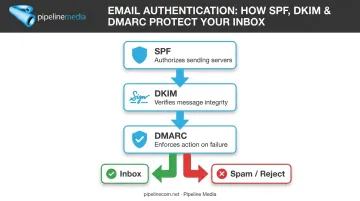
Inbox providers won't trust a domain they can't verify. Three records handle this:
- SPF authorizes which mail servers can send on your domain's behalf
- DKIM attaches a digital signature so receivers can confirm the message wasn't altered
- DMARC tells inbox providers what to do when SPF or DKIM checks fail (quarantine, reject, or do nothing)
Both Google and Yahoo made these effectively mandatory for bulk senders starting in 2024. Skip them, and expect junk-folder placement even for well-written content.
If you're using a new domain or IP, don't blast your full list on day one. AWS notes that new sending identities with no history are more likely to be blocked or filtered to junk, and reputation-building typically takes 2-6 weeks. Start with small volumes to your most engaged contacts, then scale gradually.
Step 4: Draft Compliant, Relevant Content
Your subject line is the first filter your email has to pass, both with spam algorithms and with actual humans deciding whether to click.
- Write one clear subject line tied to one focused call-to-action
- Avoid clickbait phrasing ("RE:", "You won't believe...") that trips spam filters
- Skip ALL CAPS and excessive punctuation
Every commercial email also needs specific legal elements:
| Requirement | CAN-SPAM (US) | CASL (Canada) | GDPR/ePrivacy (EU) |
|---|---|---|---|
| Sender identity | Required | Required | Required |
| Physical address | Required | Required | Not explicitly required |
| Unsubscribe link | Required, honor within 10 business days | Required, honor within 10 business days | Objection right, no set deadline |
| Consent needed | Not generally required | Express or implied consent required | Prior consent generally required |
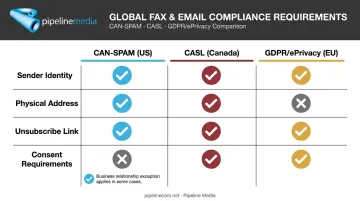
Miss the unsubscribe link or bury it in tiny gray text, and you'll trigger both legal risk and spam complaints.
Step 5: Test, Schedule, and Monitor the Send
Never send a blast without sending yourself a test first.
- Check rendering across Gmail, Outlook, and mobile
- Click every link to confirm it works
- Verify personalization fields pulled the right data (nothing worse than "Dear [FIRST_NAME]")
Once the blast goes out, watch your dashboard in real time. Rising bounce rates or spam complaints mid-send are early warning signs — catching them fast can mean pausing before the damage spreads to your entire list.
What You Need Before Sending a Mass Email Blast
Most deliverability failures are preventable. They happen because something wasn't ready before send, not because the platform failed.
Technical Requirements
- A sending platform or provider that can handle your volume without bottlenecking
- SPF, DKIM, and DMARC already configured and verified
List and Content Readiness
- A permission-based, recently engaged contact list with duplicates and bad addresses removed
- Finalized content that's been tested and complies with anti-spam laws in your target markets
Compliance and Support Readiness
- Working knowledge of CAN-SPAM, CASL, and GDPR requirements based on where your recipients live
- Access to responsive support if something breaks mid-send
Checking off every item on this list takes time most marketing teams don't have. Full-service providers remove that burden entirely: Pipeline Media's workflow, for instance, only asks clients for three things — the email list, the message content, and any logos or graphics. From there, their team handles format conversion, personalization merging, testing, and unsubscribe management, so the client never touches the technical side.
Key Parameters That Affect Email Blast Deliverability
Follow every step correctly and you can still land in spam if these underlying variables work against you.
Sender Reputation (Domain/IP History)
ISPs judge new messages partly on your sending history, and a domain with no track record starts with zero trust. Poor reputation pushes even well-crafted, fully compliant emails straight to spam. There's no content fix for a damaged reputation — only time and clean sending behavior repair it.
List Engagement Rate
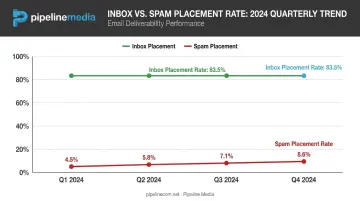
A damaged domain reputation often traces back to this next factor: list engagement. High bounce rates or consistently low opens tell ISPs your recipients don't want this mail. Validity's 2025 benchmark report found global inbox placement sitting at 83.5%, with spam placement climbing from 4.5% in Q1 2024 to 8.6% by Q4. Low engagement from part of your list drags down placement for your engaged subscribers too.
Sending Volume and Pacing
List quality aside, how fast you ramp up sending matters just as much. A sudden spike from zero to 100,000 emails looks suspicious to spam filters, especially from newer senders. Gradual, consistent volume builds trust, while abrupt bulk sends risk throttling or outright blocking. This is exactly why warm-up periods matter for new domains and IPs.
Content Quality and Personalization
Volume and pacing get your emails delivered, but what's inside them determines whether readers engage. Identical, generic content sent to your entire list reduces engagement and raises complaint rates, while basic personalization, like first name or segment-specific offers, measurably improves opens and clicks. Pipeline Media builds recipient-level merge fields into its full-service email jobs for exactly this reason.
Common Mistakes That Get Email Blasts Flagged as Spam
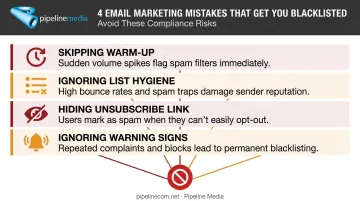
Most spam-flagged campaigns share the same handful of root causes:
- Skipping the warm-up period — blasting full volume from a brand-new domain or IP with zero sending history
- Ignoring list hygiene — mailing purchased, outdated, or unverified contacts that generate bounces and spam-trap hits
- Hiding the unsubscribe link — vague sender information or a buried opt-out mechanism violates compliance law and irritates recipients into hitting "report spam" instead
- Ignoring early warning signs — letting a campaign run while bounce rates or complaints climb mid-send instead of pausing to investigate
These issues compound quickly once they start. Spamhaus has been blunt about this: no sunset policy combined with poor bounce management is, in their words, a recipe for blocklisting. Once you're on a blocklist, even perfectly compliant future emails can get rejected during the SMTP handshake.
Managed email broadcasting services like Pipeline Media's build unsubscribe handling and compliance checks directly into each campaign, which removes this risk before a send ever goes out.
DIY vs. Full-Service: Alternatives for Sending Mass Email
The right method depends on your team's technical resources, available time, and how much control you want over the process.
Self-Service ESP or Email API Platform
When it's better: Teams with developer resources, or marketers comfortable managing lists, templates, and deliverability monitoring themselves.
Key trade-offs: More customization and direct control, but you own ongoing reputation monitoring, authentication upkeep, and compliance configuration.
Marketing Automation Suites
When it's better: Businesses that need email tied into broader workflows, like CRM syncing or multi-channel campaigns.
Key trade-offs: More integrations and features, but often higher cost with a real learning curve for smaller teams.
Full-Service Email Broadcast Provider
When it's better: Businesses without dedicated marketing or IT staff who want to send their list and content, then let professionals manage the rest.
Key trade-offs: Less hands-on control over technical settings, but the technical burden disappears entirely.
This full-service model is exactly how Pipeline Media operates, and has since 2003. Clients send a list, a message, and any graphics; Pipeline's team handles format conversion, personalization, testing, unsubscribe processing, and delivery tracking.
Most jobs go live within 60-90 minutes, without the client ever touching authentication records or reputation dashboards.
Conclusion
Sending an email blast successfully isn't about finding the perfect platform. It's about preparation: a clean, opted-in list, proper SPF/DKIM/DMARC authentication, and content that's relevant enough to earn opens instead of complaints.
Most failed campaigns trace back to skipped list hygiene or ignored sender reputation, not a platform failure. The tools work fine when the fundamentals are in place.
From here, you have two paths. Manage the infrastructure yourself for full control. Or hand off the list and content to a full-service partner like Pipeline Media, whose team manages authentication, compliance, and delivery tracking while sending campaigns at a rate of millions of emails per hour.
Frequently Asked Questions
What is the difference between an email blast and a regular marketing email?
An email blast typically goes to an entire list with little or no segmentation. Marketing emails are usually targeted to specific segments based on behavior, purchase history, or interests.
How many emails can I send at once before I'm considered a bulk sender?
Google generally classifies anyone sending 5,000 or more emails a day to Gmail addresses as a bulk sender, triggering stricter authentication and complaint-rate requirements. Yahoo has no published numeric threshold.
Is sending mass emails to my customer list legal?
Yes, when recipients have opted in and your email includes required disclosures like sender identity, a physical address, and a working unsubscribe link under CAN-SPAM, CASL, or GDPR.
What's the best time to send an email blast for maximum opens?
Optimal timing varies by audience and industry, so generic recommendations aren't reliable. Testing different days and times against your own list's open-rate data works better than following a universal "best time" chart.
Can I send a mass email directly from Gmail or Outlook?
Not safely at scale. Consumer Gmail blocks sending after roughly 500 emails a day, and Outlook.com caps around 5,000 recipients daily. Both are built for personal correspondence, not bulk campaigns.
How much does it typically cost to send an email blast to a large list?
Costs vary widely by volume and provider. DIY platforms often start around $9-$20 USD/month for smaller lists, while full-service providers—like Pipeline Media's email broadcasting service—typically work on a quote-based model tied to list size and campaign complexity.