One typo in a subject line, one purchased list, one missing unsubscribe link, and your brand can land in the spam folder or worse, on the wrong end of a compliance complaint. Business owners we talk to worry about the same handful of things: sending to the wrong list, watching engagement flatline, or accidentally breaking a law they didn't know existed.
This guide covers the practical do's and don'ts of mass email sending, what "compliant" actually means under CAN-SPAM, GDPR, and CASL, and how to tell if your current approach is helping or hurting your sender reputation.
Key Takeaways
- Email blasts are one-to-many, unsegmented messages, different from transactional or personalized campaigns.
- List hygiene, segmentation, and proper authentication (SPF, DKIM, DMARC) directly improve deliverability.
- CAN-SPAM, GDPR, and CASL violations carry real fines, making opt-outs and honest subject lines non-negotiable.
- Outsourcing to a provider that handles compliance and unsubscribe management removes this burden for businesses that don't want to own it in-house.
What Is an Email Blast (Mass Email)?
An email blast, sometimes called a mass email or bulk email, is a single message sent simultaneously to a large group of recipients without segmentation. Everyone gets the same content, at the same time, regardless of their interests or history with your brand.
Knowing when a blast makes sense — versus when it doesn't — starts with understanding how it differs from two other common email types:
- Transactional emails — triggered automatically by a user action, like an order receipt or password reset
- Segmented campaigns — subscribers are divided into smaller groups based on criteria like purchase history or engagement, so each group gets more relevant content
Common Use Cases for Email Blasts
Blasts still have their place, particularly when a message genuinely applies to your entire list:
- Company-wide announcements (leadership changes, policy updates)
- Product launches
- Regular newsletters
- Service outage notifications
- Time-sensitive promotions or flash sales
Pipeline Media's email broadcasting service handles these blast-style campaigns at scale, delivering millions of emails per hour with tracking and compliance management built in — useful when a time-sensitive message needs to reach your full list fast.
The Do's of Mass Email Sending
Build a Permission-Based List
Every recipient on your list should have actively agreed to receive your emails. Double opt-in, where subscribers confirm their email address after signing up, does three things: validates the address, blocks bot-generated signups, and confirms real intent.
Purchased or rented lists skip all of that. Mailchimp specifically flags these as high-risk sources of spam traps, and a single trap hit can damage your domain reputation enough to trigger denylisting.
Segment Even Within a "Blast"
Even a broad send can benefit from basic segmentation. Split by interest, purchase history, or recent engagement, and the numbers shift meaningfully. HubSpot's 2023 State of Marketing data found segmented emails generate 30% more opens and 50% more clickthroughs than unsegmented ones.
Authenticate Your Domain
SPF, DKIM, and DMARC are the technical backbone ISPs use to verify you're a legitimate sender:
- SPF tells receiving servers which systems are authorized to send on your domain's behalf
- DKIM cryptographically signs your messages so receivers can detect tampering
- DMARC tells inboxes what to do when SPF or DKIM checks fail
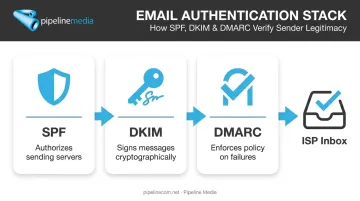
Gmail and Yahoo now require all three for bulk senders. Skip this setup and your emails risk landing in spam before anyone even reads the subject line. This authentication layer is exactly the kind of technical setup that trips up businesses managing sends in-house, which is why full-service providers like Pipeline Media handle SPF, DKIM, and DMARC configuration as part of their email broadcasting campaigns.
Warm Up New Domains and IPs
Sending 50,000 emails on day one from a brand-new domain is a red flag to ISPs. There's no sending history to justify that volume, so filters get suspicious fast.
The fix: start small. Send to your most engaged subscribers first, then gradually increase volume over several weeks. Amazon SES, for reference, spreads its own warm-up schedule over 45 days for new dedicated IPs.
Monitor Performance Metrics After Every Send
Track these four numbers after each campaign:
| Metric | Industry Benchmark |
|---|---|
| Open rate | ~21.5% average |
| Bounce rate | ~0.7% average |
| Unsubscribe rate | ~0.1% average |
| Spam complaints | Keep below 0.1% |
These benchmarks come from Campaign Monitor's analysis of over 100 billion emails sent in 2021. Note that Apple's Mail Privacy Protection can inflate open counts, so pair opens with click and conversion data for a truer picture.
Keep Content Honest and Valuable
Write subject lines that describe what's actually inside the email. If the content wouldn't matter to your entire list, it probably shouldn't be a blast in the first place.
The Don'ts of Mass Email Sending
Don't Skip the Warm-Up Period
Sudden high-volume sends from an unestablished sender get flagged almost immediately. There's no shortcut around building sender reputation gradually.
Don't Email Old, Unverified, or Purchased Lists
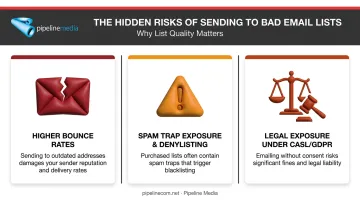
Stale and purchased lists are loaded with risk:
- Higher hard-bounce rates that damage your sender score
- Spam trap addresses that can get your domain denylisted
- Consent gaps that create legal exposure under CASL and GDPR
M3AAWG's research notes that recycled spam traps often come from addresses inactive for 12 months or more. If your list hasn't been cleaned in over a year, assume it's carrying dead weight.
Don't Mislead Recipients With Clickbait Subject Lines
If the subject line promises something the email doesn't deliver, or if a marketing message is disguised as a transactional one, you're violating recipient trust and likely regulatory requirements too. CAN-SPAM explicitly prohibits deceptive subject lines.
Don't Send Generic Content Indefinitely
A one-size-fits-all approach might work occasionally, but relying on it for every send drives unsubscribes and spam complaints over time. This matters more than ever: spam accounted for 47.27% of global email traffic in 2024, according to Kaspersky's annual report. Inboxes are crowded and recipients are quick to flag anything that feels irrelevant.
Don't Ignore or Bury Unsubscribe Requests
CAN-SPAM requires the opt-out link to stay functional for at least 30 days, and unsubscribe requests must be honored within 10 business days. Burying it or ignoring requests damages your reputation and breaks the law. Agencies managing bulk sends, including Pipeline Media's email broadcasting service, build unsubscribe compliance directly into every campaign for this reason.
Don't Overload Subscribers With Excessive Frequency
Frequency fatigue is real. A widely cited MarketingCharts survey found 35% of recipients named "too many emails" as their top reason for unsubscribing. Before increasing send frequency, check your unsubscribe-reason data and compare it against feedback from your most engaged subscribers.
Is Email Blasting Illegal? Understanding Compliance
Email blasting itself is completely legal. What's illegal is doing it without following the rules.
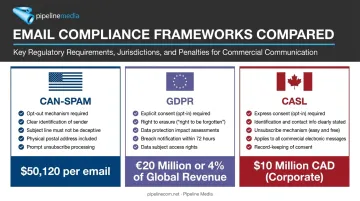
CAN-SPAM (US) requires:
- Accurate sender information in headers
- No misleading or deceptive subject lines
- A clear, working opt-out mechanism
- Unsubscribe requests processed within 10 business days
Violations can cost up to $53,088 USD per violating email, according to current FTC guidance.
Two other frameworks matter depending on your audience:
- GDPR (EU contacts): Requires a lawful basis for processing personal data, and consent, when used, must be freely given and easy to withdraw. Fines can reach €20 million or 4% of global turnover.
- CASL (Canadian contacts): Requires express or valid implied consent, sender identification, and a working unsubscribe mechanism, with requests actioned without delay. Penalties can reach CAD $10 million for a business.
Here's a quick comparison of how the three frameworks stack up:
| Framework | Applies To | Consent Standard | Max Penalty |
|---|---|---|---|
| CAN-SPAM | US recipients | Opt-out (no prior consent required) | $53,088 USD per email |
| GDPR | EU recipients | Lawful basis, often opt-in | €20 million or 4% of turnover |
| CASL | Canadian recipients | Express or implied opt-in | CAD $10 million |
Any Canadian company sending across North America needs to satisfy CASL and CAN-SPAM simultaneously the moment a campaign touches Canadian inboxes. Pipeline Media, as a Toronto-based agency serving clients throughout the US and Canada, builds this dual compliance into every campaign it manages.
Choosing the Right Way to Send Your Email Blasts
You've got two real paths here: manage everything yourself through a self-serve ESP, or hand it to a full-service provider.
Going DIY means you own every piece: list hygiene, SPF/DKIM/DMARC setup, warm-up schedules, unsubscribe processing, and ongoing compliance monitoring. Doable, but it takes real time and technical know-how to get right.
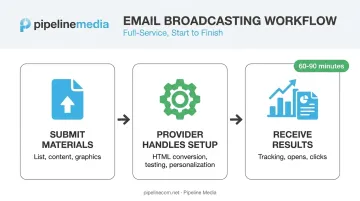
Going full-service shifts that burden elsewhere. Pipeline Media's Email Broadcasting service, for example, works like this:
- Submit your materials: send your email list, message content, and any logos or graphics
- Pipeline handles setup: converting Word or PDF files into HTML, testing and retesting before launch, and personalizing messages through merge fields
- Receive your results — detailed tracking reports showing undeliverable emails, opens, and link/image clicks
The service sends millions of emails per hour, with most campaigns live within 60-90 minutes of submission. Pipeline also manages the unsubscribe system directly and helps clients stay within current email regulations.
Because campaigns are often time-sensitive (think product launches or service outage notices), having a real person respond within minutes matters. Pipeline's team is built around that kind of immediate response, so a stalled campaign doesn't sit waiting on a support ticket queue.
Frequently Asked Questions
What is a mass email or email blast?
A mass email, or email blast, is a single message sent to a large group of recipients simultaneously without segmentation. It differs from transactional emails, which are triggered by user actions, and from segmented campaigns, which target smaller, defined groups.
Is email blasting illegal?
No, email blasting is legal when it complies with laws like CAN-SPAM, CASL, or GDPR, depending on your recipients' location. Violations, such as missing opt-outs or misleading subject lines, are what create legal risk and potential fines.
How much is a 1,000 email list worth?
List value depends on engagement quality, not size. Purchased lists carry little real value and can hurt deliverability, while an organically grown, engaged list of 1,000 can generate meaningful revenue over time.
What's the difference between an email blast and a segmented email campaign?
An email blast sends identical content to your entire list at once. A segmented campaign divides recipients into groups by interest or behavior, delivering more relevant content that typically performs better.
How many emails can I send at once without being flagged as spam?
Gmail defines bulk senders as those sending 5,000+ messages per day, though Yahoo sets no specific number. Authentication and list hygiene matter more than the raw volume you're sending.
Do email blasts still work in today's inbox environment?
Yes, particularly for urgent or universally relevant messages like outage alerts or major announcements. They perform best when paired with basic personalization and a clean, permission-based list.