This is exactly what an email blast solves.
The term has picked up some baggage in marketing circles, often lumped in with spam or lazy mass-messaging. But sent correctly, an email blast remains one of the fastest, most affordable ways to put an urgent message in front of a large audience. This guide breaks down what an email blast actually is, the different types businesses rely on, how to send one properly, and the legal rules you can't afford to skip.
Key Takeaways
- An email blast sends one message to most or all of a contact list at once, prioritizing speed over personalization for time-sensitive messages
- Use blasts for time-sensitive news — flash sales, closures, event reminders — not as your everyday marketing tactic
- CAN-SPAM compliance requires accurate sender info, honest subject lines, and a working unsubscribe link
- Pipeline Media handles list management, sending, and compliance for clients who'd rather not run blasts manually
- Track clicks and conversions over opens, since Apple's privacy protections now distort open-rate data
What Is an Email Blast?
An email blast — also called an e-blast, mass email, or bulk email — is a single, stand-alone message sent to all or most of a contact list at the same time, with minimal to no segmentation. Everyone gets the same content, the same subject line, the same call to action.
The goal here is reach and speed, not relationship-building. You're pushing one specific, time-sensitive action: register now, buy before midnight, show up Saturday. That's a different job than nurturing a lead over months.
It helps to see how a blast compares to other email types:
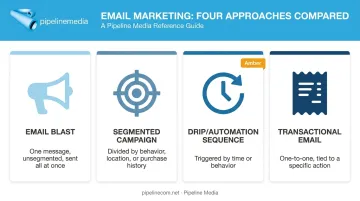
| Term | What Makes It Different |
|---|---|
| Email blast | One message, unsegmented list, sent all at once |
| Segmented campaign | List divided by behavior, location, or purchase history for relevance |
| Drip/automation sequence | Pre-written messages triggered by time or user behavior |
| Transactional email | One-to-one automated message tied to a specific action (order confirmation, password reset) |
Each format serves a different strategic purpose. A blast trades relevance for speed, and that trade-off works fine as long as you understand why you're making it. Agencies running full-service email broadcasting, including Pipeline Media, typically help clients decide which format fits a given message before it goes out.
Email Blast vs. Newsletter vs. Campaign
Here's where it gets confusing: newsletters technically are email blasts. They go out to most of your list at once, just like a flash-sale announcement would. The difference is intent.
- Newsletters recur on a schedule and mix content types — company updates, blog links, curated info — rather than pushing one single action
- Targeted campaigns use segmentation and personalization on purpose, sacrificing some speed for relevance
- Blasts intentionally skip segmentation because the message needs to go out now, to everyone
Campaign Monitor's marketing guidance has argued that "email blasts no longer work" for audiences that expect personalized content. That's a fair critique of blasting as a default strategy. But it's not an argument against the technology itself, it's an argument against overusing it. A well-timed blast for a genuinely urgent announcement still lands. The mindset shift is using it as an occasional tool, not your only tool.
What Are the 4 Types of Email Marketing?
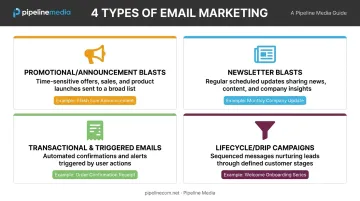
There's no single industry-standard taxonomy here: Mailchimp lists nine email categories, and HubSpot splits things differently again. But for practical purposes, most business sends fall into four buckets, and email blasts are one of them.
Promotional/Announcement Blasts
These push a single offer or piece of urgent news to your full list. Think flash sales, limited-time discounts, or breaking company updates.
Subject line examples that work well here:
- "24 Hours Only: 40% Off Everything"
- "We're Closing Early Today: Here's Why"
- "Last Chance: Registration Closes Tonight"
Newsletter Blasts
Newsletters recur on a set cadence (weekly, monthly) and blend multiple content types instead of pushing one CTA. A single issue might include:
- A product update or feature release
- A roundup of recent blog posts or resources
- A customer spotlight or case study
No single "buy now" moment required.
Transactional & Triggered Emails
These aren't blasts at all. They're automated, individual sends triggered by a specific user action — an order confirmation, a shipping notice, a password reset. One person, one action, one email.
Lifecycle/Drip Campaigns
Drip campaigns are segmented and sequenced based on where a subscriber sits in the customer journey. A welcome series, an abandoned-cart sequence, a re-engagement flow — all drip. The opposite of a blast's one-and-done nature.
Real-world example of an email blast: A retailer sends a single message to its entire 50,000-contact list announcing a 48-hour storewide sale. No segmentation, no sequence, just one message and one CTA sent to everyone at once. Agencies that manage bulk email delivery, including full-service providers like Pipeline Media, handle exactly this kind of send: one list, one message, delivered at scale with tracking and compliance built in.
How to Send an Effective Email Blast
Getting a blast right isn't complicated, but skipping steps here is how businesses end up in spam folders instead of inboxes.
Step 1: Build a Permission-Based List
Only include contacts who opted in. Purchased or scraped lists aren't a shortcut — they're a liability. Campaign Monitor's guidance is direct: a purchased list does not count as permission, and the FTC treats address harvesting as an aggravated CAN-SPAM violation, not a minor technicality. Non-permission lists also tank deliverability fast, landing future campaigns in spam even when you've cleaned up your act.
Step 2: Choose How You'll Send It
You've got two real options:
- Self-manage through an email service provider, handling list uploads, design, and troubleshooting yourself
- Work with a full-service provider that manages the entire send on your behalf
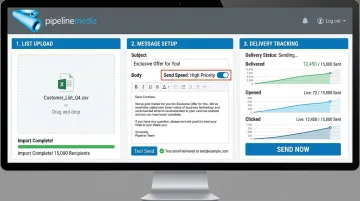
The second option is where a service like Pipeline Media's email broadcasting fits. Instead of wrestling with an ESP's interface, you send your list, message, and any logos or graphics — Pipeline handles setup, testing, and delivery from there. Their system can process millions of emails per hour, with most campaigns live within 60 to 90 minutes of submission. They also apply merge-field personalization so even a broad send doesn't feel generic, and every job is tested twice before it goes out.
That combination — speed plus a human check before launch — is what separates a managed send from simply hitting "go" on your own ESP account.
Step 3: Apply Light Segmentation Where Practical
A blast doesn't have to be completely unsegmented. Splitting by region, customer type, or engagement level — even loosely — can boost relevance without meaningfully slowing you down.
Step 4: Craft the Message
Keep it scannable:
- Write a clear, honest subject line (no bait-and-switch)
- Use one strong CTA — not three competing ones
- Design for mobile first, since most opens happen on a phone
Step 5: Schedule Strategically
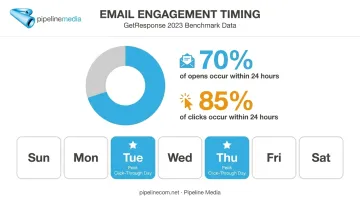
There's no universal "best" time that works for every list. GetResponse's 2024 benchmark report, which analyzed more than 4.4 billion emails sent in 2023, found engagement fairly stable across the workweek, with Tuesday and Thursday producing the strongest click-through rates. Roughly 70% of opens and 85% of clicks happened within 24 hours of sending. Rather than chase a one-size-fits-all rule, test send times against your own audience's habits.
Step 6: Track Performance
Focus on:
- Click-through rate — who actually engaged
- Conversions — who took the action you wanted
- Deliverability — whether your emails reached inboxes at all
- Unsubscribe rate — a signal of list fatigue
Open rates deserve less weight than they used to. Apple's Mail Privacy Protection preloads tracking pixels for protected users, inflating open numbers regardless of whether someone actually read the email. Clicks and conversions are more honest metrics now.
Email Blast Best Practices
A few rules keep blasts effective instead of annoying:
- Cadence matters — Campaign Monitor's analysis of over 2 billion emails found roughly every two weeks hits the sweet spot; test against your own unsubscribe data to fine-tune.
- One CTA only — competing calls to action confuse readers and dilute results
- Avoid legacy spam triggers — excessive "FREE," repeated dollar signs, and ALL CAPS can still raise flags, though sender reputation and authentication now matter more than any single word
- Use a real reply-to address — skip "no-reply@" and let people respond; it's a free feedback channel
Getting cadence, compliance, and deliverability right on every send is exactly what a managed email broadcasting service handles behind the scenes.
Pros and Cons of Email Blasts
Advantages:
- Fast, wide reach for time-sensitive news
- Low cost relative to paid ads or direct mail
- Simple to schedule and execute under deadline pressure
Drawbacks:
- Feels impersonal without any segmentation
- Higher risk of spam complaints than targeted sends
- Repeated overuse damages sender reputation and drives unsubscribes
Mailchimp's own research on segmentation found segmented campaigns generated 100% more clicks and fewer unsubscribes than unsegmented sends. That's the core trade-off: blasts win on speed, segmented campaigns win on relevance. Managed email broadcasting services address the spam and reputation risks directly, building compliance and unsubscribe handling into every send rather than leaving it to chance.
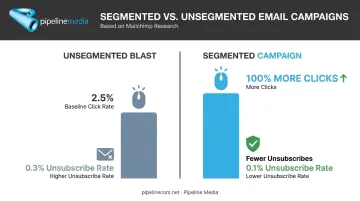
Use blasts sparingly: treat them as an occasional tool for genuinely urgent, broad announcements, not your default way of emailing.
Is Email Blasting Legal? Compliance Basics
Email blasting itself is completely legal. What's illegal is sending to people who never consented, or ignoring disclosure requirements.
In the US, the CAN-SPAM Act requires:
- Accurate sender information (no misleading From/Reply-To fields)
- Subject lines that reflect the actual content
- A clear, functioning unsubscribe link, honored within 10 business days
- A valid physical postal address in the email
Businesses can't outsource away liability, either: both the company and the sender can be held responsible if a vendor mishandles compliance.
This is where a full-service provider earns its fee. Pipeline Media builds unsubscribe management directly into its email broadcasting service, processing opt-out requests automatically so businesses aren't manually tracking every request against a 10-day deadline.
Frequently Asked Questions
What are email blasts?
An email blast is a single message sent to a large portion of a contact list at once, with little to no segmentation. It's typically used for urgent or broad announcements rather than personalized, ongoing outreach.
Is email blasting illegal?
No, blasting itself is legal. In the US, it must comply with the CAN-SPAM Act, and in Canada, with CASL — both require consent-based sending, accurate sender information, and a working opt-out option.
What are the 4 types of email marketing?
The four common categories are promotional/blast emails, newsletters, transactional emails, and lifecycle/drip campaigns. Each serves a different purpose, from urgent announcements to automated, behavior-triggered messages.
What is an example of an email blast?
A common example is a retailer announcing a 48-hour storewide sale to its entire email list. It's one message, one CTA, sent to everyone at once with no segmentation.
How often should a business send email blasts?
A reasonable range is once a month to once a week, depending on your audience's tolerance. Testing against your own unsubscribe and engagement data is more reliable than following a blanket rule.
What's the difference between an email blast and a newsletter?
Newsletters are recurring and relationship-focused, mixing multiple content types on a schedule. Blasts are one-off, urgent, and built around a single action — even though both may reach a broad list.